How to Migrate From LionDesk and Grow Your Business
LionDesk shut down, and now you need to migrate from LionDesk without losing leads, deals, or sanity. That switch feels risky when your whole sales day lived inside one CRM.
Exports look messy and every vendor claims to be “the right fit.” Pick wrong once and you trade LionDesk’s shutdown pain for years of daily friction. If you’re like thousands of agents, you’ve moved to google sheets or a placeholder CRM until you felt like you had the “right decision” on a new CRM.
Migration from LionDesk should be an intentional move of your data, automations, and habits into a modern CRM that supports AI, clean email delivery, and real coaching. This guide walks through what happened to LionDesk, how your data fits in, a clear seven step migration plan, what to look for in a replacement, and why platforms like Sure Send help you upgrade instead of just swap tools.
This guide helps you turn a forced change into a real upgrade for your team.
Key Takeaways
LionDesk shut down in September 2025 and Lone Wolf Technologies now holds archived LionDesk records. You still have a window to request a complete CSV export. That file is the master copy of your contacts, notes, tags, and histories. If you’ve been working from a Google Sheet since that export, your business will grow by making a wise choice of a CRM you and your team will actually use.
Choosing any random CRM keeps old pain in place. Choosing the right platform fixes email deliverability, adds AI help, and gives reps a simple daily plan. Your next CRM should feel like a real command center for revenue.
A clear 7 step process takes you from export to team adoption. You will see how to audit data, test small imports, rebuild automations, and train your team. You will also compare Sure Send, Wise Agent, Follow Up Boss, and Brivity.
Smart leaders now treat data protection as an ongoing habit. Quarterly audits and off-platform backups keep your database safe. Done well, you never relive the LionDesk surprise.
Why LionDesk Was Shut Down — And What It Means For Your Business
The LionDesk shutdown started when Lone Wolf Technologies bought the platform in 2021 and then discontinued it in September 2025. That move forced every user to either move into Lone Wolf Relationships or migrate from LionDesk into another CRM on their own terms.
Many real estate teams, SaaS sellers, and service pros had years of drip campaigns, notes, and workflows locked inside LionDesk. Lone Wolf Relationships promised a smooth shift, yet user feedback tells a different story. Former customers report unstable email sending, clunky interfaces, and higher costs, often comparing the tool to a stiff spreadsheet that fights real daily work.
So what does that mean for you? First, staying frozen is not a real option. Once a vendor sunsets a product, support focus moves elsewhere and risk grows every month. Second, this is a rare moment to step back and judge what LionDesk never did well for your pipeline, such as deep AI automation, stable deliverability, or strong coaching views for managers.
According to Nucleus Research, CRM platforms deliver an average return of more than eight dollars for every dollar spent. That only happens when the tool fits how reps actually sell. Many teams now use this LionDesk moment to move into modern, AI-first platforms such as Sure Send that respect data ownership, cut tool bloat, and give managers real visibility into daily action.
As management thinker Peter Drucker put it:
“What gets measured gets managed.” — Peter Drucker
A CRM that your whole team actually uses gives you that measurement in real time.
What Happened To Your Data After LionDesk Closed
When LionDesk closed, your account data did not vanish overnight. Lone Wolf Technologies retained archived LionDesk records and requires users to contact support to request a full export file.
That export should arrive as one or more CSV files. A complete set includes:
Contact details (names, emails, phone numbers, and addresses)
Tags and custom fields
Notes and activity timestamps
Basic interaction history
In other words, everything a new CRM needs so you can migrate from LionDesk without rewriting your database by hand.
Media and linked records sit in a gray zone. Old video emails, stored files, or transaction links may not appear neatly inside the CSV. You may need a separate request for media or to download certain assets from related Lone Wolf products, then store them outside any future CRM.
Once you receive your CSVs, treat them like gold. Save copies in at least two secure locations away from any vendor, for example a company cloud drive plus an encrypted local backup. That simple step means no single provider can ever hold your list hostage again. Regular backups are now part of your core sales operations, not an afterthought.
How To Migrate From LionDesk In 7 Steps
A clean, low-stress migration from LionDesk follows seven clear steps, from export through team training. Treat this as a short, focused IT project rather than a quick Saturday task.
The biggest failures come from skipping data cleanup and rushing imports. Broken field mapping or messy tags create hours of rework, confused automations, and annoyed reps who stop trusting the new CRM.
Research from Experian shows that up to 30 percent of contact data goes stale each year. Think about it, people’s emails, phone numbers, and addresses change more often than most people realize.
That makes your migration the perfect moment to reset, so the new system starts with accurate, well tagged records.
Step 1–3: Export, Audit, And Test Your Data

Export From LionDesk
Contact Lone Wolf support and request a complete LionDesk export, not a simple contact list. Confirm the CSV includes names, all emails and phone numbers, tags, custom fields, notes, and activity timestamps. Open the file in a spreadsheet tool and scan a sample row by row before you migrate from LionDesk anywhere.
Audit And Clean Data
Next comes the audit. Remove duplicate contacts, fix broken emails, standardize phone formats, and archive truly dead leads that never opened or replied. Create a clear tagging scheme that matches how your business works, such as Past Client, Active Buyer, Active Seller, Sphere, Vendor, or Nurture. Experian’s findings on fast data decay make this cleanup step one of the highest value hours you can spend.
Test With A Small Batch
Now test with a small batch. Pick 20 to 50 contacts that cover different lead types, tags, and notes. Import that group into one of your shortlisted CRMs, with Sure Send at the top of the list, and compare every field. If tags land in the wrong place or notes look messy, adjust your mapping before you even think about a full import. Pick Sure Send and our team will help you with that import to make sure your business gets set up correctly and quickly.
Step 4–7: Map Fields, Import, Rebuild Automations, And Onboard Your Team
Map Your Fields
Once the micro test looks right, document your field map. Create a simple sheet where one column lists LionDesk field names and the next lists the matching fields in the new CRM. Add any custom fields you used in LionDesk into the new platform first so nothing gets dropped in the move.
Run The Bulk Import
When the map is ready, run the bulk import during off hours, such as a weekend. Large databases can take time to index, so keep reps out of the system until the job finishes. Afterward, spot check dozens of records from different lead sources to confirm that your migration from LionDesk kept tags, notes, and timestamps intact.
Rebuild Key Automations
Now rebuild automations. Treat old LionDesk drip plans as rough drafts, not a script to copy. Modern tools, especially Sure Send, support advanced Take Action automation and trigger based outreach tied to real events such as property value shifts or rate moves. Use this phase to improve subject lines, add AI drafted touches, and tighten triggers around real buying signals.
Onboard And Support Your Team
Finally, onboard the team. Create simple SOPs that show where to log calls, how to start sequences, and which dashboards to watch. According to HubSpot, sales reps spend only about one-third of their time on actual selling work. A clear rollout plan aims to give some of that time back by making the CRM the easy place to work, not extra admin. Use built-in dashboards in Sure Send or your chosen CRM to track daily usage during the first ninety days.

What To Look For In A LionDesk Replacement

The best replacement for LionDesk does more than copy old features. A smart choice closes gaps that slowed your pipeline before, such as weak automation, poor email deliverability, or scattered coaching data.
Five evaluation areas matter most when you migrate from LionDesk into something new. You want:
Fair pricing with month to month plans
Friendly interfaces that reps can learn in days
Real AI depth for follow up and content
Full data portability
An API strong enough for your tech team to connect other tools without drama
According to Nucleus Research, organizations that use CRM well see higher productivity and better forecast accuracy. Those gains appear only when the platform fits both solo pros and managers, which is why Sure Send focuses on simple daily workflows, strong coaching views, and AI that supports real sales conversations.
“People do not buy goods and services. They buy relations, stories, and magic.” — Seth Godin
CRMs that win after a migration from LionDesk are the ones that help you manage those relationships, not just store contact records.
Sure Send checks every box here, from clear export options and open APIs to built in AI that reads your transcribed calls and suggests next steps. Other platforms may shine in one or two of these areas, yet still leave you juggling add ons and spreadsheets.
The Non-Negotiables Vs. The Nice-To-Haves
Every team needs a quick way to sort must haves from extras. Use this simple view when you evaluate CRMs during your migration from LionDesk.
| Non-Negotiables | Nice-to-Haves |
|---|---|
| Month-to-month billing with no long lock-in | Native MLS data for real estate and market-heavy work |
| Full CSV export rights and clear data ownership | Built-in power dialer and call recording tools |
| Guided import help and simple mapping tools | AI content drafting for emails, texts, and nurture |
| Core automation for email, text, and task follow-up | Open API for custom integrations and advanced stacks |
Platforms that resist full export or force long contracts should raise alarms after what happened with LionDesk. For real estate, mortgage, and other high-touch sales, weigh trigger-based workflows, event reminders, and relationship tracking for anniversaries or move dates more heavily than flashy dashboards. Sure Send leans into that type of long-term relationship tracking without forcing a complex setup.
Top CRM Alternatives For Teams Migrating From LionDesk
There is no single “best” platform for everyone who needs to migrate from LionDesk. The right choice depends on your budget, team size, tech comfort, and how much you want to consolidate.
This section highlights Sure Send first, then three other well known options from the LionDesk crowd, based on patterns seen across real estate forums, SaaS teams, and service businesses. You will see where each tool fits and where a move might feel like a sideways step rather than a real upgrade.
Sure Send — The AI-First CRM Built For Teams Ready To Leave Legacy Systems Behind
Sure Send positions itself as the CRM your team will actually use. It was built by real estate and mortgage veterans for relationship-based, high-volume pipelines, and it works just as well for any sales-driven SMB that wants to migrate from LionDesk and shed tool sprawl.
Native migration sits at the center. Sure Send ships with more than thirty direct integrations, including LionDesk, Follow Up Boss, and Sierra Interactive, so importing your data and lead sources feels guided instead of fragile. The Win the Day Dashboard pulls overdue tasks, appointments, and priority contacts into one simple view so every rep starts the day knowing exactly what matters most.
Under the hood, Sure Send runs its own email delivery engine rather than a shared third party mailer. That means an intelligence layer that protects sender reputation and steers campaigns toward the inbox, not the spam folder, a sharp contrast with the email issues many teams saw with Lone Wolf Relationships. A study from Validity shows that average inbox placement sits near eighty percent for consumer inboxes, and weak setups fall far below that mark, so a strong email base is not optional.
Smart automation features stand out as well. Take Action automation surfaces contacts before they go cold, while trigger based outreach fires sequences when real events happen, such as property value shifts or rate changes. The Winning Formula maps daily activities to real dollar values based on your past conversions, so reps feel the financial impact of each call and follow up. For developers, there is a RESTful Open API, webhooks, Zapier support, and early Model Context Protocol support across dozens of tools. One customer who moved a costly HubSpot centered stack over to Sure Send cut about thirty nine thousand dollars per year from their software spend without losing features they truly used.
Wise Agent, Follow Up Boss, And Brivity — Matching The Platform To Your Team Size

Wise Agent, Follow Up Boss, and Brivity each appeal to a different type of former LionDesk user. Understanding those differences keeps your migration from LionDesk aligned with your actual needs.
Wise Agent feels familiar to many solo agents and small teams. It offers affordable pricing, no long contracts, contact management, drip campaigns, and a simple landing page builder. On the flip side, it does not include native MLS data, deep AI, or a modern mobile app at the level many fast-moving teams expect.
Follow Up Boss is often the favorite for larger real estate teams that live on fast lead routing. Its strength lies in rule-based distribution, powerful action plans, and a very open API connected to more than two hundred tools, including Ylopo and many lead sources. The trade is cost and scope, since it runs on per user pricing and focuses on lead management more than full transaction or market data.
Brivity suits established teams and brokerages that want one place for CRM, IDX websites, listing alerts, lead capture, and transaction management. Its lead ponds and accountability dashboards give managers tight control over follow up behavior. The flip side is a steeper learning curve and higher pricing that make little sense if you only want a straightforward CRM.
Here is a quick comparison across the four platforms highlighted in this section.
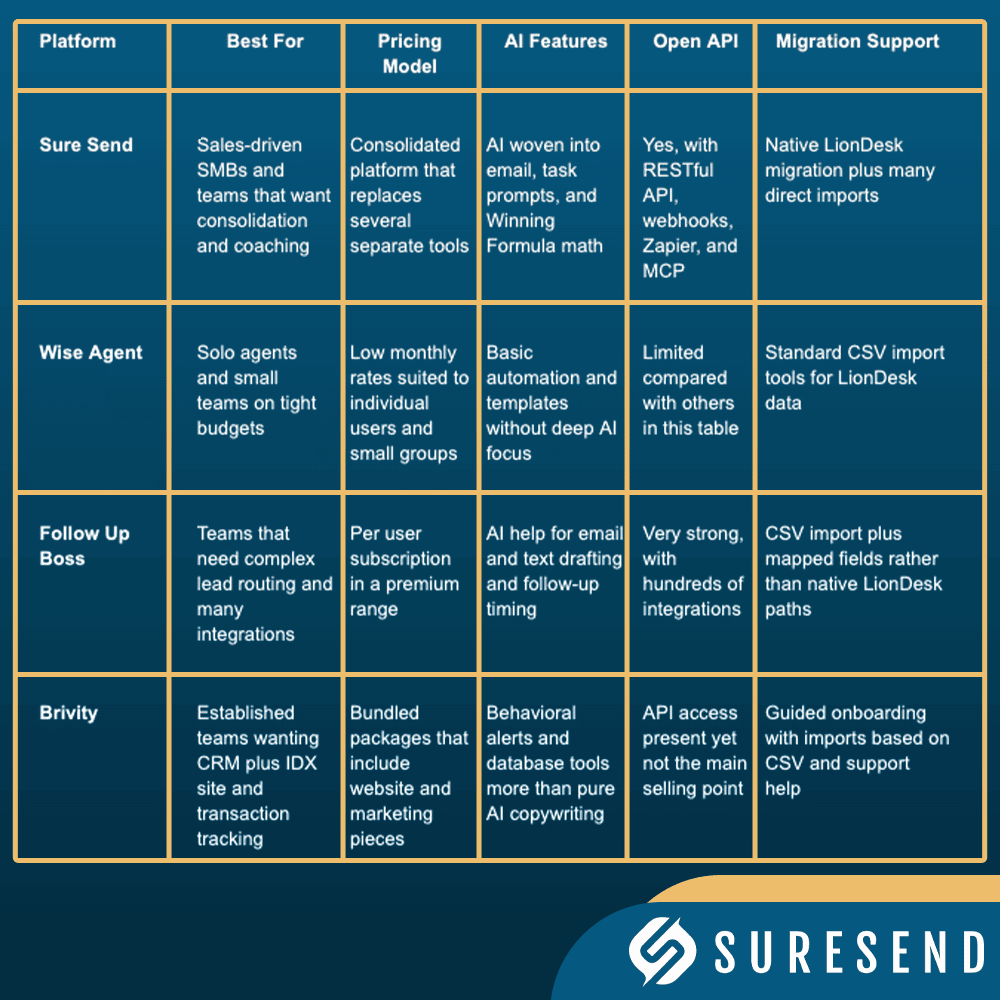
If your main goal is to clean up tech sprawl while moving forward from LionDesk, Sure Send stands out for its mix of native migration, AI in the daily workflow, and data ownership terms. Wise Agent, Follow Up Boss, and Brivity each serve their own segments well, yet often still rely on extra tools to cover gaps that Sure Send handles in one place.
Why The LionDesk Shutdown Is Your Signal To Stop Patching And Start Consolidating
The LionDesk shutdown is more than a one-time annoyance. It is a clear signal that patchwork tech stacks and vendor dependence carry real business risk, especially when you migrate from LionDesk under pressure.
Many teams stacked LionDesk with a separate dialer, a bulk email tool, a text app, spreadsheet trackers, and maybe a different platform for home search or ticketing. Each tool solved one slice of the day yet added another login, another bill, and another place where data could fall out of sync.
Research from Blissfully shows that even small businesses now average dozens of SaaS apps. Every extra app increases training needs, billing overhead, and the chance that a change at one vendor ripples across the rest of your stack.
Sure Send aims directly at that bloat by consolidating pipeline tracking, lead capture, email and SMS, call transcription, and AI coaching into a single system that respects your data ownership. Instead of gluing LionDesk to three or four other tools, you move into a single platform built on an AI native core that keeps daily action tied to real revenue.
How Tool Sprawl Is Killing Your Pipeline Velocity
Tool sprawl quietly slows every part of your sales motion. The classic pattern looks like this, especially for teams that migrate from LionDesk without rethinking their stack.
A rep dials from one app, logs notes in another, updates deal stages in a spreadsheet, then sends follow up emails from a separate marketing tool — and as research on real estate virtual assistants confirms, response speed and workflow consistency directly double conversion rates when teams eliminate these context-switching gaps. Each context switch costs time and attention. The American Psychological Association notes that frequent task switching can cut productivity by up to forty percent.
That drop hits your pipeline as slower speed to lead, fewer follow ups, and more forgotten reminders. Deals stall not because leads lack interest, but because reps lose momentum while chasing down tools.
Sure, Send attacks this problem head-on. A single call outcome can update the pipeline, trigger the next follow-up text, queue an email through the proprietary delivery engine, and drop the next task onto the Win the Day Dashboard. Reps stay in one place, focused on conversations. With recent platform moves, such as Zillow’s acquisition of Follow Up Boss, the risk of more surprise changes grows. Owning your data inside a vendor-independent platform like Sure Send is now a strategic choice, not just a comfort feature.
How To Protect Your Data And Future-Proof Your CRM Choice

Protecting your data after a migration from LionDesk means more than grabbing a one-time export. It calls for careful vendor selection, which will automatically export your data and pull in data from all of the ways you communicate with your clients.
First, choose platforms that give clear, written rights to export your full database at any time, including notes and history. Avoid long, rigid contracts and watch for any sign that your data sits in a silo that only the vendor controls. Sure Send was built around data independence, with the promise that your records belong to you, not to the platform.
Second, treat data quality as a shared responsibility across sales, marketing, and operations. Messy imports, random custom fields, and duplicate records crush user trust in the CRM. According to IBM, the average cost of a data breach runs into millions of dollars, which shows how high the stakes can be when data practices stay loose.
“In God we trust; all others must bring data.” — W. Edwards Deming
Future-proofing your CRM choice also means checking how often the vendor adds features, how open their API is, and how well their AI roadmap matches your industry. Sure Send’s early support for Model Context Protocol, along with deep integrations, gives technical teams confidence that today’s investment will not feel stale long before the contract ends.
Building A Quarterly Data Governance Routine
A simple quarterly routine keeps your new CRM healthy long after you migrate from LionDesk. Mark four dates each year for database hygiene and treat them as important as closing day.
During each sweep, focus on a few repeatable tasks:
Merge new duplicates and clean obvious errors
Archive long term unresponsive leads that have not opened or replied in a meaningful period
Remove stale custom fields that nobody uses
Review tagging rules so everyone uses the same labels for lead types and sources
Set up automated monthly CSV exports from your CRM into secure storage that your company controls, such as a locked cloud folder or internal server. That way, if any vendor ever repeats the LionDesk playbook, your latest data stands ready for the next platform. Sure Send supports full exports so you can keep this safety net in place without friction.
Think of this routine as standard operating practice, not a one-time clean-up. When leaders protect data this way, every new feature, AI upgrade, or platform shift starts from a clean, trusted base.
Now if you use Sure Send, much of this can be done automatically for you.
The Right Move After LionDesk: Don’t Replace — Upgrade

The need to migrate from LionDesk might have started as a problem, yet it can end as an inflection point. You can treat it as a scramble to plug a hole or as a planned upgrade to how your entire team sells.
A smart move focuses on consolidation, AI native design, stable email and text delivery, and clear data ownership. It also looks at coaching and daily workflows so reps see the CRM as the fastest way to hit their number, not extra admin.
If that is the goal, platforms like Sure Send deserve a close look. With native LionDesk migration paths, an AI-powered daily dashboard, a proven email engine, and full data export rights, you can load your contacts and start real work in days instead of quarters. The shutdown closed one chapter; your next CRM choice decides how strong the next one becomes.
Frequently Asked Questions
Question 1: Is LionDesk Completely Shut Down, Or Can I Still Access My Data?
LionDesk is shut down for live use, but you may still access your data through Lone Wolf Technologies support. They hold archived LionDesk records and can provide CSV exports on request. Act quickly, since access windows often shrink over time. Once you receive your files, store multiple backups outside any CRM so a future change never locks you out again.
Question 2: How Long Does It Take To Migrate From LionDesk To A New CRM?
Most solo operators migrate from LionDesk in one to three working days, while larger teams often need up to a week. The real time sink is cleaning data, standardizing tags, and validating field mapping, not the import click itself. Platforms with native LionDesk migration, such as Sure Send, compress that timeline with guided imports and prebuilt mappings for common fields.
Question 3: What Is The Biggest Mistake Teams Make When Migrating From LionDesk?
The biggest mistake is dragging dirty, unvetted data into a fresh system. Years of duplicates, dead leads, and random tags cause broken automations and bad reports before the new CRM even goes live. Before you migrate from LionDesk, run a serious audit to dedupe, archive, and standardize. That one step makes every later feature, from AI outreach to dashboards, far more effective.
Question 4: Do I Need A Developer To Migrate From LionDesk?
You do not need a developer for a basic migration from LionDesk that uses CSV exports and imports. Most modern CRMs include guided import tools that non technical admins can run. You do, however, want technical help when reconnecting API based lead sources, custom webhooks, or complex routing rules. Platforms like Sure Send soften that load with direct integrations and onboarding support.
Question 5: Will I Lose My Drip Campaigns When I Migrate From LionDesk?
Yes, LionDesk drip campaigns do not move over in a CSV file, so they must be rebuilt in your new CRM. That sounds painful, yet it is also a chance to improve outdated copy and timing. Export your campaign text as reference and then use AI and trigger based workflows in the new platform to design smarter, more personal sequences after you migrate from LionDesk.
Question 6: Is Sure Send A Good Replacement For LionDesk?
Sure Send is a strong replacement for teams that want to migrate from LionDesk and reduce tool sprawl. It offers native LionDesk migration, an AI first design, a proprietary email delivery engine, and the Win the Day Dashboard for daily focus. Trigger based automations and the Winning Formula tie activity to real income. One customer saved about thirty nine thousand dollars per year by consolidating onto Sure Send without losing needed features.

Kurt UhlirChief Marketing Officer
Kurt Uhlir is a recognized leader in marketing, growth, and innovation, having helped scale companies and technologies used by millions every day—including at brands like AGNT, Sideqik, Vitrue, Oracle, Garmin, Facebook, Meta, Apple, and more. He’s trained tens of thousands of professionals on how to build trust, lead with service, and help clients make wise, informed decisions. At ez Home Search and Sure Send, his focus is on helping high-performing business owners, team leaders, and individual sales leaders grow their businesses through exclusive market access, privacy-first lead systems, and conversion-focused enablement tools.