
Best Email Deliverability Tools for Higher Inbox Rates
Improving your email deliverability rate with dedicated tools starts with seeing what really happens after you hit send. The right email deliverability tools help you test inbox placement, warm up domains, fix authentication, and monitor reputation so more messages reach real people instead of spam folders. When those tools feed back clear data, you can adjust copy, cadence, and sending patterns with confidence.
The catch is simple. Most platforms only tell you that an email was “delivered”, not whether it landed in the inbox. According to Validity, global inbox placement sits around 83.5 percent, which means roughly 1 in 6 marketing emails never reaches the inbox at all.
This guide walks through what these tools actually do, the best options for 2026, how authentication changes your results, and how to build a stack that fits your team. Along the way, you will see where Sure Send replaces entire stacks by building deliverability into the CRM itself so you can run outreach, follow ups, and reporting from one place.
Key Takeaways
“Delivered” is not the same as inboxed. “Delivered” only means a mail server accepted the message, while true inbox placement shows whether a human is likely to see it. Most dashboards hide this gap, which is where dedicated testing and monitoring tools matter.
Around 1 in 6 legitimate marketing emails never reaches the inbox, based on benchmarks from Validity, EmailToolTester, and Litmus. That loss hits revenue long before teams notice a problem.
The main categories of email deliverability tools cover sending platforms, quick diagnostics, deep testing, ongoing monitoring, and active reputation building, each aimed at a different weak point.
Authentication with SPF, DKIM, DMARC, and BIMI delivers some of the fastest improvement for the lowest cost, and it is now required for bulk senders on Gmail and Yahoo according to Google and Yahoo.
Consolidating sending, CRM, analytics, and deliverability into a single platform like Sure Send reduces tool sprawl and shrinks the number of failure points that quietly damage inbox placement over time.
What Do Email Deliverability Tools Actually Do?

Email deliverability tools exist to close the gap between “accepted by the server” and “seen in the inbox”. They tell you where messages land, why they land there, and what to change so more of them show up in primary tabs instead of spam folders. Without this layer, you only see delivery rate, which hides the real story.
As many deliverability consultants like to say, “You can’t fix what you can’t see.” Dedicated tools provide that missing visibility.
Industry research from Validity and EmailToolTester shows global inbox placement hovering around the low 80s, which means a large slice of campaigns never has a chance to perform. For sales and marketing teams, that invisible loss shows up as weak open rates, fewer replies, and slower pipeline.
At a practical level, most email deliverability tools cover five main jobs. Together, those jobs give you a full view of technical health, content risks, and reputation trends.
Inbox Placement Testing
These tools send test messages to seed inboxes on Gmail, Outlook, Yahoo, and others, then report where your email lands. You see whether it reaches primary, promotions, spam, or disappears. That view lets you fix problems before a big campaign rather than after numbers crash.Email Warm Up
Warm up tools slowly build trust for new or damaged domains by sending small volumes, getting opens and replies, and moving messages out of spam. According to ZeroBounce, domains that skip warm up are far more likely to trigger filters once volume rises, especially for cold outreach.Authentication Verification
Quick check and monitoring tools confirm SPF, DKIM, and DMARC records. They flag missing records, syntax errors, and SPF records that exceed the 10 lookup limit. Fixing these issues often leads to fast gains in inbox placement across major providers.Reputation Monitoring
Reputation tools track spam complaints, bounce rates, spam trap hits, and blacklist status over time. For example, GlockApps and SendForensics send alerts when a domain or IP gets listed or when complaint rates spike.Spam Content Analysis
Content analyzers scan your subject lines and body for spammy phrases, broken HTML, missing unsubscribe links, and other filter triggers. Tools like Unspam.email and Mailtrap score your content and suggest specific edits that lower spam risk.
The Five Categories Of Email Deliverability Tools
The five categories of email deliverability tools describe how each product fits into your stack and which problem it solves best. Understanding these categories keeps you from buying overlapping software or expecting a single tool to handle every job well.
Full-Stack Deliverability Platforms
Full-stack platforms combine sending, analytics, reputation tracking, and sometimes testing inside one interface. Teams that send high volumes or need developer friendly APIs often start here.Quick Check Tools
Quick check tools live in your browser and give instant feedback on DNS health, SPF, DKIM, DMARC, and blacklist status. MXToolbox and PowerDMARC are popular examples.Testing Tools
Testing tools use seed lists and spam scoring to show how upcoming campaigns will perform before you go live. GlockApps, Unspam.email, and Folderly sit in this group.Monitoring Tools
Monitoring tools from mailbox providers such as Google Postmaster Tools, Microsoft SNDS, and Yahoo Sender Hub show how those specific services treat your domain, and research on Who Did Not Implement Google’s new email sender guidelines highlights just how many senders still lack proper compliance. According to Google, ignoring this data can lead to rejections once spam complaints exceed 0.3 percent.Optimization Tools
Optimization tools focus on warm up and active reputation building. Platforms such as InboxAlly, TrulyInbox, and Emailwarmup.com simulate real engagement to teach mailbox algorithms that your messages are wanted.
The Best Email Deliverability Tools Today
The best email deliverability tools in 2026 help you send, test, monitor, and improve inbox placement without guesswork. Each tool on this list fills a different role, from in house delivery engines to quick diagnostics and active reputation repair. The right mix depends on your volume, your current stack, and how much control you want over the sending environment.
According to EmailToolTester, average deliverability across 15 major email service providers sits around 83.1 percent, with more than 10 percent of messages going to spam. That spread between providers, and between good and weak setups inside each provider, is why careful tool choice matters.
Below is a curated group of platforms and utilities that stand out for 2026, starting with Sure Send, which folds deliverability intelligence into the CRM itself.
1. Sure Send – AI Native CRM With Proprietary Email Delivery Engine
Sure Send is the only entry on this list that replaces third party email infrastructure instead of connecting to it. The platform runs a fully proprietary, in house email delivery engine under the Sure Send CRM, so your campaigns, sender reputation, and analytics live inside one controlled system instead of across several vendors.
Because the engine sits inside the CRM, Sure Send can use its AI email intelligence layer to study contact level behavior and send patterns in real time. The AI reads who opens, who clicks, and who ignores, then shapes send timing, audience segments, and follow ups to support inbox placement along with engagement. That means fewer blasts to cold segments and more focused campaigns to people who actually respond.
Take Action Automation solves another quiet deliverability problem, which is inconsistent sending. The system surfaces contacts who need follow up and builds daily action lists, so reps send on a steady rhythm instead of in chaotic bursts that scare filters. Built in analytics track recipients, opens, clicks, bounces, unsubscribes, and even UTM performance for each send.
One organization moving off HubSpot reported cutting annual CRM costs by tens of thousands of dollars while adding AI features the team actually uses. Just as important, Sure Send keeps a data firewall between customer accounts and its parent company ez Home Search, so your contact lists and sender reputation never feed someone else’s marketing engine.
Best Fit
Sure Send shines for SMBs, sales teams, and growth focused organizations that want deliverability, CRM, automation, and analytics in one system instead of a loose stack of separate tools.
Pricing
Visit suresend.ai for current plans and demos.
2. Mailtrap – Built For Developer And Product Teams
Mailtrap is a popular email delivery platform for developers and product teams that send high volumes of transactional and marketing email. Independent tests show inbox placement around 78.8 percent on its free plan, with Gmail, Outlook, Hotmail, and Yahoo all reporting strong spam filter scores.
The platform offers a clean dashboard with deep drill downs across deliverability rate, opens, bounces, complaints, unsubscribes, and provider breakdowns. A dedicated bulk stream keeps marketing traffic separate from transactional flows, which helps protect key messages like password resets and receipts.
Mailtrap also bundles free SPF, DKIM, DMARC, and blacklist checkers along with access to deliverability specialists. That mix makes it a practical option when developers want direct control without juggling several tools.
Best Fit
Product companies and developer teams that value analytics and API access.
Pricing
Free for up to 1,000 emails per month, then paid tiers from 15 dollars to enterprise plans.
3. Smartlead – Best For Cold Outreach At Scale
Smartlead is purpose built for cold email teams that manage many mailboxes and domains. Independent tests report inbox placement around 75.49 percent, with Gmail near 81 percent and Outlook almost 89.4 percent, plus a very low spam rate of about 1.55 percent.
The platform supports unlimited mailboxes, automated warm up, and SmartDelivery pre send placement checks. Before a campaign goes live, Smartlead can show you how test messages perform across providers so you can adjust content, throttling, and volume.
Auto mailbox rotation and dynamic IP rotation help spread volume across accounts, which reduces stress on any one sender identity. On the technical side, Smartlead validates SPF, DKIM, and DMARC automatically and tracks blacklist status.
Best Fit
SDR teams, agencies, and lead generation shops that live on cold outreach.
Pricing
Free tier available, with paid plans starting near 39 dollars per month.
4. Postmark – Reliability For Transactional Email
Postmark focuses on fast, reliable transactional email for developers. In independent testing, it reached roughly 83.3 percent inbox placement overall, with perfect delivery into Gmail and Outlook inboxes and strong scores from SpamAssassin.
Postmark separates transactional and bulk mail into different sending streams, which keeps critical messages away from marketing reputation swings. Every plan includes 45 days of full message history, making it easy to debug issues or verify what went out.
Real time webhooks and global infrastructure help product teams track events and keep latency low. For dev teams that want simple, trustworthy sending rather than a sprawling marketing suite, Postmark is a solid choice.
Best Fit
Developer and product teams that need reliable transactional email.
Pricing
Free for small volumes, with paid plans beginning around 15 dollars per month.
5. GlockApps – Deep Pre Send And DMARC Testing
GlockApps sits in the testing category and gives you a clear view of where emails land before a launch. Its Inbox Insight feature checks placement across more than 70 seed inboxes on Gmail, Outlook, Yahoo, and others, showing primary inbox, promotions, spam, and missing results in one screen.
Beyond placement, GlockApps provides DMARC analytics, blacklist monitoring, and uptime tracking with alerts. The platform also runs spam content checks based on SpamAssassin rules and suggests specific fixes.
For teams without in house deliverability skill, GlockApps offers paid consulting sessions to review reports and set a plan. According to GlockApps, consistent pre send testing reduces surprise spam placement when lists or content change.
Best Fit
Marketing teams and agencies that rely on campaigns and want clear, test based feedback before every big send.
Pricing
Free plan with two spam tests, then paid tiers starting near 59 dollars per month.
6. Unspam.email – Actionable Insight For Non Technical Users
Unspam.email takes complex deliverability checks and turns them into plain language, visual feedback. The standout feature is an AI powered attention heatmap that predicts where readers will look inside your email, paired with spam filter scoring and authentication checks.
Instead of handing you a raw number, the tool explains which parts of the message might cause trouble and what to change. Inbox placement tests run against major providers, and the AI assistant surfaces step by step suggestions.
With strong ratings on G2 and Product Hunt, Unspam.email feels friendly for founders, marketers, and agency owners who do not want to read raw DNS logs.
Best Fit
Non technical users who want simple answers and clear fixes.
Pricing
Free tier with a limited number of tests, plus paid plans starting around 9 dollars per month.
7. Free Monitoring Tools – Google Postmaster, Microsoft SNDS, And Yahoo Sender Hub
The three free monitoring dashboards from Google, Microsoft, and Yahoo belong in every sending stack, no matter which paid tools you choose. Together they show how each major consumer provider treats your domain based on spam rate, reputation, and authentication.
Google Postmaster Tools covers Gmail. It reveals spam rate, domain and IP reputation, authentication status, and bulk sender compliance. Google warns that spam rates above 0.3 percent can trigger problems, and many experts aim for 0.1 percent or lower based on tests shared by Validity.
Microsoft SNDS focuses on Outlook and Hotmail. It highlights spam trap hits, filter results, and IP behavior that you cannot see anywhere else. Yahoo Sender Hub, launched recently, gives similar insight for Yahoo Mail and supports advanced features such as BIMI logos.
Best Fit
Any sender at any size. These dashboards are free and act as a shared source of truth for inbox behavior.
Pricing
All three tools are free once you verify domain ownership.
8. InboxAlly – Active Reputation Building Through Seed Engagement
InboxAlly is an optimization tool that goes beyond simple warm up. It uses real inboxes and scripted interactions to show mailbox providers that your messages tend to get opened, clicked, replied to, and moved out of spam.
You add a seed list from InboxAlly into your sending platform, configure which engagement actions to perform, and send campaigns to those addresses. InboxAlly then opens, clicks, replies, rescues messages from spam, and moves them into primary folders in realistic patterns.
Over time, these signals teach filters that email from your domain draws positive attention. For domains with a rough history or for heavy cold outreach, that kind of active repair can lift inbox placement meaningfully, as customer case studies on InboxAlly describe.
Best Fit
Teams that need to rebuild or strengthen domain reputation rather than just maintain it.
Pricing
Plans start near 149 dollars per month with higher tiers for larger seed volumes.
9. MXToolbox – Fast, Free Authentication Diagnostics
MXToolbox is often the first stop when something breaks. Its SuperTool accepts a domain, IP address, or mail server hostname and returns instant checks for SPF, DKIM, DMARC, MX records, and blacklist status.
You can also send a test email to a special MXToolbox address to receive detailed header and spam analysis. That makes it simple to see where problems lie without digging through server logs.
According to MXToolbox, millions of lookups run on the service every day, which speaks to its role as a daily utility for admins and marketers alike.
Best Fit
Any team that wants quick, no cost checks before opening support tickets or hiring outside help.
Pricing
Core tools are free, with paid plans for deeper monitoring that start around 129 dollars per month.
Why Authentication Is The Highest ROI Email Deliverability Investment

Email authentication gives mailbox providers proof that your messages are real, which is why it delivers such strong gains in inbox placement. When SPF, DKIM, and DMARC are set correctly, providers can trust who you are, block spoofers, and treat your campaigns more kindly.
Research cited by Valimail shows that fully authenticated senders reach inboxes at rates more than 30 percentage points higher than unauthenticated senders, a finding consistent with the large-scale dataset behind SendGuard900K: Massive Dataset for metadata-based quality assurance of email marketing. Forrester estimates a three year return above 300 percent for DMARC based brand protection, thanks to fewer phishing incidents and better deliverability.
Despite that upside, most domains still lag behind. Valimail reports that roughly 84 percent of email sending domains have no DMARC record at all, and only a small slice enforce a reject policy. Google and Yahoo are tightening rules, so this gap now becomes a deliverability problem, not just a security gap.
A handy way to think about this: authentication proves you are who you say you are, while reputation shows whether people actually want what you send.
Sure Send treats authentication and sender reputation as core design pieces rather than afterthoughts. Because the platform runs its own email engine, it can line up authentication, list hygiene, cadence control, and AI driven engagement intelligence in one loop instead of leaving customers to wire together several vendors.
What SPF, DKIM, DMARC, And BIMI Actually Do
SPF, DKIM, DMARC, and BIMI work together to answer two simple questions for mailbox providers: who is allowed to send on behalf of this domain, and what should happen when someone fakes it.
SPF (Sender Policy Framework)
SPF lives in your DNS records and lists which mail servers can send email for your domain. When a message arrives, the receiving server compares the sending IP to that list. If SPF is missing, broken, or above its lookup limit, many providers lower trust immediately.DKIM (DomainKeys Identified Mail)
DKIM adds a digital signature to each email using keys that live in DNS. The receiving server checks that signature to confirm the message was not changed in transit and really came from an authorized sender.DMARC (Domain-based Message Authentication, Reporting, And Conformance)
DMARC sits on top of SPF and DKIM. It tells providers what to do when either fails, whether to monitor, quarantine, or reject messages — and studies like Who Did Not Implement Google’s sender guidelines reveal that the majority of domains have still not enforced these policies despite growing requirements. It also sends back reports so you can see who is sending on your domain and where failures occur.BIMI (Brand Indicators For Message Identification)
BIMI is a newer standard that shows your verified brand logo inside supporting mail clients when DMARC enforcement is in place. Yahoo Sender Hub and some advanced platforms help brands set BIMI up, which both boosts recognition and reinforces that messages are authentic.
According to Google and Yahoo, bulk senders who skip these steps now face rejections alongside spam filtering.
How To Build The Right Email Deliverability Tool Stack For Your Team

Building the right deliverability stack means fitting tools to your sending patterns instead of buying every shiny product. No single platform covers sending, testing, monitoring, and deep repair at the highest level in every situation, so smart teams mix categories on purpose.
A simple starting sequence looks like this:
Set up SPF, DKIM, DMARC, and BIMI for all sending domains.
Connect free provider dashboards such as Google Postmaster Tools, Microsoft SNDS, and Yahoo Sender Hub.
Add pre send testing for major campaigns using a placement tester.
Use warm up and engagement tools when launching new domains or heavy cold outreach.
Keep your CRM and sending platform aligned so lists stay clean and cadence stays steady.
The starting point is always the same. Get authentication right, watch sender reputation across Gmail, Outlook, and Yahoo, then add pre send testing and warm up where risk is highest. According to Validity, steady inbox placement depends on this kind of ongoing discipline more than any one feature.
Sure Send reduces this stacking burden for many SMBs by bundling CRM, campaigns, analytics, automation, and its own deliverability engine. For those teams, extra tools are often limited to quick DNS checks or occasional deep tests.
Stack Recommendations By Use Case

Cold outreach teams such as SDR groups and outbound agencies benefit from a mix of warm up, testing, and monitoring. A common stack pairs a placement tester like GlockApps, a warm up and engagement tool like InboxAlly or TrulyInbox, a quick check service such as MXToolbox, and Google Postmaster Tools for Gmail insight. This setup helps new domains ramp safely and protects them as volume scales.
Transactional email and product teams mostly care about consistent sending and clear error data. For them, Mailtrap or Postmark act as the sending base, while PowerDMARC or similar services manage authentication across multiple domains. Adding Google Postmaster, Microsoft SNDS, and Yahoo Sender Hub fills out provider level monitoring.
Enterprise marketing operations often already have dedicated deliverability staff. They lean on broader platforms like Everest by Validity for testing, blacklist alerts, competitive insight, and sender score tracking. InboxAlly or Folderly can layer on top when reputation repair is needed, and DMARC management tools keep authentication solid as brands add more domains.
SMBs on tight budgets can get a long way with free and low cost options. MXToolbox and Sender Score handle quick checks, TrulyInbox or Emailwarmup.com can cover light warm up, and Unspam.email offers affordable pre send tests. Running Google Postmaster and Yahoo Sender Hub in the background adds important visibility at no extra cost.
Teams that adopt Sure Send gain a different pattern. Because the CRM, delivery engine, automation, and analytics all live together, reps work inside one daily system while the platform protects cadence, list health, and sender reputation behind the scenes. That consolidation cuts down on logins and also removes the data gaps between separate tools that often wreck deliverability over time.
Key Email Deliverability Metrics You Need To Track

Email deliverability metrics turn raw sending into a measurable system. Instead of guessing, you see which numbers reflect inbox health, which indicate filter trouble, and where to act first. Without that view, it is easy to chase the wrong target, such as raw delivery rate rather than inbox placement.
According to Validity, the global inbox placement rate is a bit above 83 percent. That leaves plenty of room for improvement, especially for senders who still lack full authentication or who run aggressive cold outreach. Tools from Google, Microsoft, Yahoo, ZeroBounce, and others make these numbers visible so you can handle problems early.
The key idea is simple. Inbox placement rate is the outcome that ties most closely to revenue, while everything else acts as a warning sign. When you keep the warning signs within safe ranges, inbox placement stays healthy.
Tip: Review your core deliverability metrics at least once a week and after every major campaign so you can spot trouble while it is still small.
The Core Metrics Explained
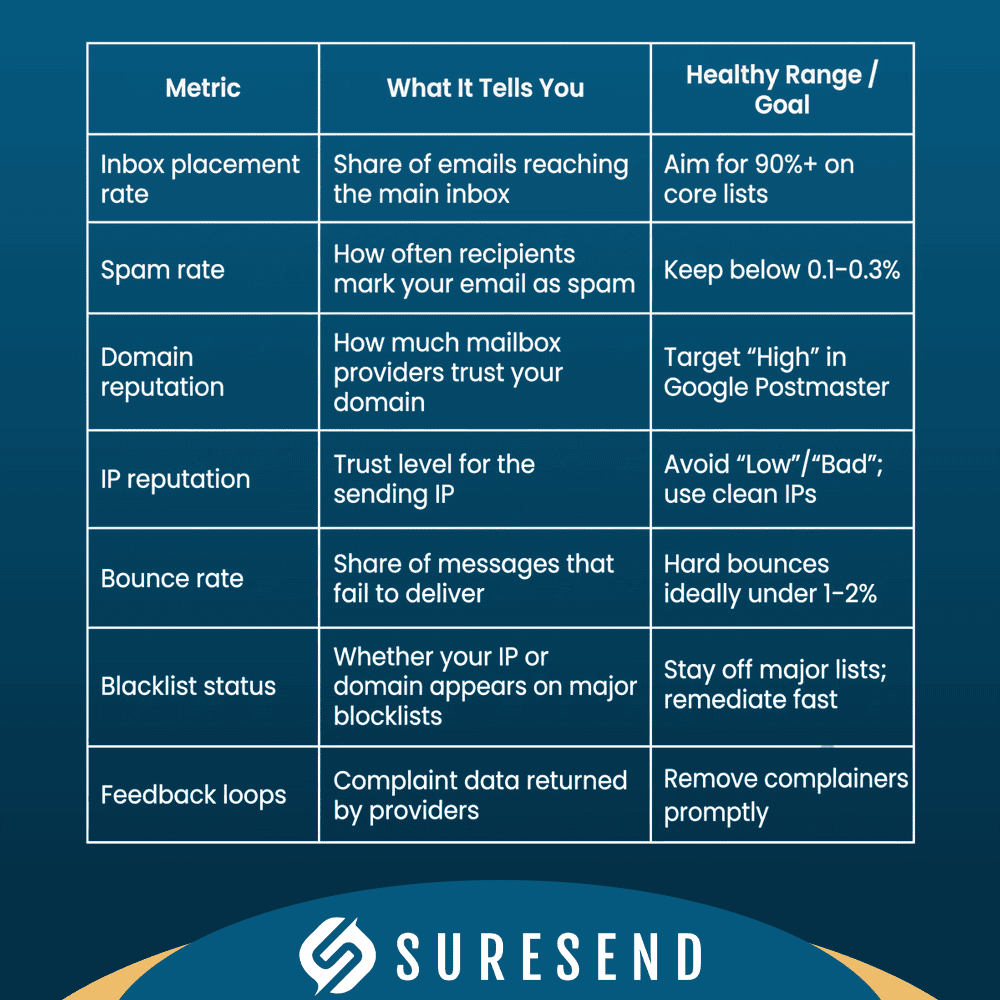
Inbox Placement Rate
Inbox placement rate measures how many of your sent messages arrive in the primary inbox rather than spam, promotions, or not at all. Many studies, including benchmarks from Validity, place global averages around the low 80s. Strong programs push this into the 90s by pairing authentication with steady, relevant sending.Spam Rate
Spam rate shows the share of recipients who hit the spam button on your messages, and research such as Deep learning-based spam detection illustrates how modern mailbox providers increasingly rely on behavioral signals — not just content rules — to make that classification. Google advises keeping this below 0.3 percent, and many experts aim for 0.1 percent or less. A climbing spam rate often points to poor targeting or tired lists, and it can quickly drag down domain reputation if ignored.Domain Reputation
Domain reputation is the trust score mailbox providers assign to your sending domain. Tools like Google Postmaster label it as High, Medium, Low, or Bad. Drop below Medium and you will often see more spam placement, slower delivery, and stricter throttling until behavior improves.IP Reputation
IP reputation applies the same idea to the sending IP address. On shared IPs, other senders can damage your standing, which is why some brands choose dedicated IPs or proprietary infrastructure. Platforms like Sure Send control this layer in house instead of sharing with unrelated senders.Bounce Rate
Bounce rate measures how many emails fail to deliver. Hard bounces reflect invalid or dead addresses and should lead to immediate suppression. Soft bounces cover temporary problems such as full inboxes or provider timeouts. High hard bounce rates usually reveal list quality issues.Blacklist Or Blocklist Status
Blacklists such as Spamhaus and Barracuda track IPs and domains associated with spam or abuse. A listing can cause broad rejections across many providers. Tools like MXToolbox, GlockApps, and PowerDMARC watch these lists so teams can request removal and correct root causes.Feedback Loops
Feedback loops, often shortened to FBL, are programs from providers that send reports when users mark your messages as spam. Using FBL data to remove complainers helps keep spam rates low and protects reputation over time.
For a quick reference, you can think about the metrics this way:
Wrapping Up
The main lesson is straightforward. A high delivery rate does not mean people actually see your messages, and the gap between “delivered” and “inboxed” can quietly erase a big slice of your marketing or sales effort.
Email deliverability tools give you the missing view into placement, authentication, content risk, and reputation. Fixing SPF, DKIM, and DMARC brings some of the fastest gains, especially now that Gmail and Yahoo require proper setup for bulk senders.
From there, your choice is either to stitch together several separate tools or pick a platform that bakes deliverability into the core. Sure Send follows the second path, with a proprietary email engine, AI driven email intelligence, and full CRM and automation in the same place. If you want fewer moving parts and more revenue from the emails you already send, it is worth seeing how Sure Send performs for your team.
Frequently Asked Questions
What Is The Difference Between Email Delivery Rate And Inbox Placement Rate?
Email delivery rate measures how many messages a receiving server accepts, while inbox placement rate measures how many reach the primary inbox. Messages in spam, promotions, or missing entirely still count as delivered. Most ESP dashboards stop at delivery, which hides serious problems. Inbox placement connects directly to opens, replies, and revenue.
How Do I Test My Email Deliverability For Free?
You can test email deliverability for free with a few core tools:
Google Postmaster Tools and Yahoo Sender Hub show spam rates and reputation after you verify your domain.
MXToolbox checks SPF, DKIM, DMARC, and blacklist status at no cost.
Unspam.email offers a free tier for spam tests.
InboxAlly provides a free spam tester address for quick checks.
Combining these views gives you a solid read on technical health and inbox placement trends without paying upfront.
How Long Does It Take To Warm Up A New Email Domain?
Warm up for a new domain usually takes four to eight weeks before high volume sending is safe. You start with very low daily volumes, maybe 10 to 20 messages, and step up gradually while watching spam rates and reputation.
Tools like TrulyInbox, InboxAlly, and Emailwarmup.com automate the process and report progress. Rushing volume too early often lands campaigns in spam and can damage a fresh domain for months.
What Causes Emails To Go To Spam Even When Authentication Is Correct?
Emails can still go to spam when authentication looks fine for several reasons:
Content may trigger filters if subject lines or body text feel spammy, or if HTML is broken.
Sending to old, disengaged lists tells providers your messages are unwanted.
Sudden volume spikes raise suspicion and can cause throttling.
On shared IPs, other senders can hurt your reputation even if your own setup is clean.
Deliverability tools that cover content testing, list hygiene, and provider level monitoring help you spot which of these is causing trouble.
What Is DMARC And Do I Really Need It?
DMARC is a policy in your DNS that tells receiving servers what to do when SPF or DKIM checks fail. It also sends you reports about who is sending with your domain and how often failures occur.
For bulk senders to Gmail and Yahoo, DMARC is now required, not optional. Studies cited by Forrester show strong financial returns from DMARC through better deliverability and reduced spoofing, especially for brands that deal with phishing attempts.
How Does A CRM Affect Email Deliverability?
A CRM affects deliverability through how it sends and how teams use it daily. Many CRMs outsource sending to a third party, which limits visibility into reputation and authentication. Poor adoption leads to stale lists and erratic campaigns, both of which harm inbox placement.
A CRM like Sure Send, with its own delivery engine and AI email intelligence, can actively guard sender reputation while reps work their normal day. By tying contact data, sending behavior, and analytics into one system, it becomes much easier to keep lists clean, cadence steady, and inbox placement strong.

Kurt UhlirChief Marketing Officer
Kurt Uhlir is a recognized leader in marketing, growth, and innovation, having helped scale companies and technologies used by millions every day—including at brands like AGNT, Sideqik, Vitrue, Oracle, Garmin, Facebook, Meta, Apple, and more. He’s trained tens of thousands of professionals on how to build trust, lead with service, and help clients make wise, informed decisions. At ez Home Search and Sure Send, his focus is on helping high-performing business owners, team leaders, and individual sales leaders grow their businesses through exclusive market access, privacy-first lead systems, and conversion-focused enablement tools.