


Real Estate CRM Data Privacy: Who Else Can See Your Contacts?
Most real estate agents spend years building a contact list, then hand it to a CRM without ever asking who else can see it. That’s the real privacy risk behind real estate agent data privacy questions: it’s rarely about hackers, and almost always about the fine print nobody reads before signing up.
Your brokerage, your teammates, your CRM vendor, and sometimes that vendor’s parent company all have some level of access to your database and or the actions of your clients.
The problem is that most agents couldn’t tell you which of those parties can see what, or what they’re allowed to do with it. This guide walks through exactly what a CRM collects, who can view it inside your team, who might see it outside your brokerage, how to read the privacy policy clauses that actually matter, and what rights you have over data you spent years building.
We’ll also look at a real, publicly documented example (Follow Up Boss under Zillow) to show how these clauses play out in practice. Sure Send, an AI-native CRM for real estate and mortgage teams, comes up a few times here as one way to think about structural versus policy-based privacy protections. Let’s get into what your CRM actually knows about your contacts first.
Key Takeaways
Your CRM tracks far more than names and emails, including behavioral data, call logs, and financial readiness signals that reveal more than agents realize.
There’s a real difference between who sees your contacts on your team and what your CRM vendor (or its parent company) is contractually allowed to do with them.
Five contract clauses decide your actual privacy exposure: data ownership, vendor use, affiliate sharing, anonymized data use, and what happens when you close your account.
The Follow Up Boss policy change under Zillow, effective November 15, 2025, shows how a parent company’s broader product mix can split your contacts into different data-handling tiers.
Before signing or leaving any CRM, check export options, ask direct questions about parent company access, and look for structural guarantees rather than policy promises alone.
What Data Does Your Real Estate CRM Actually Collect?
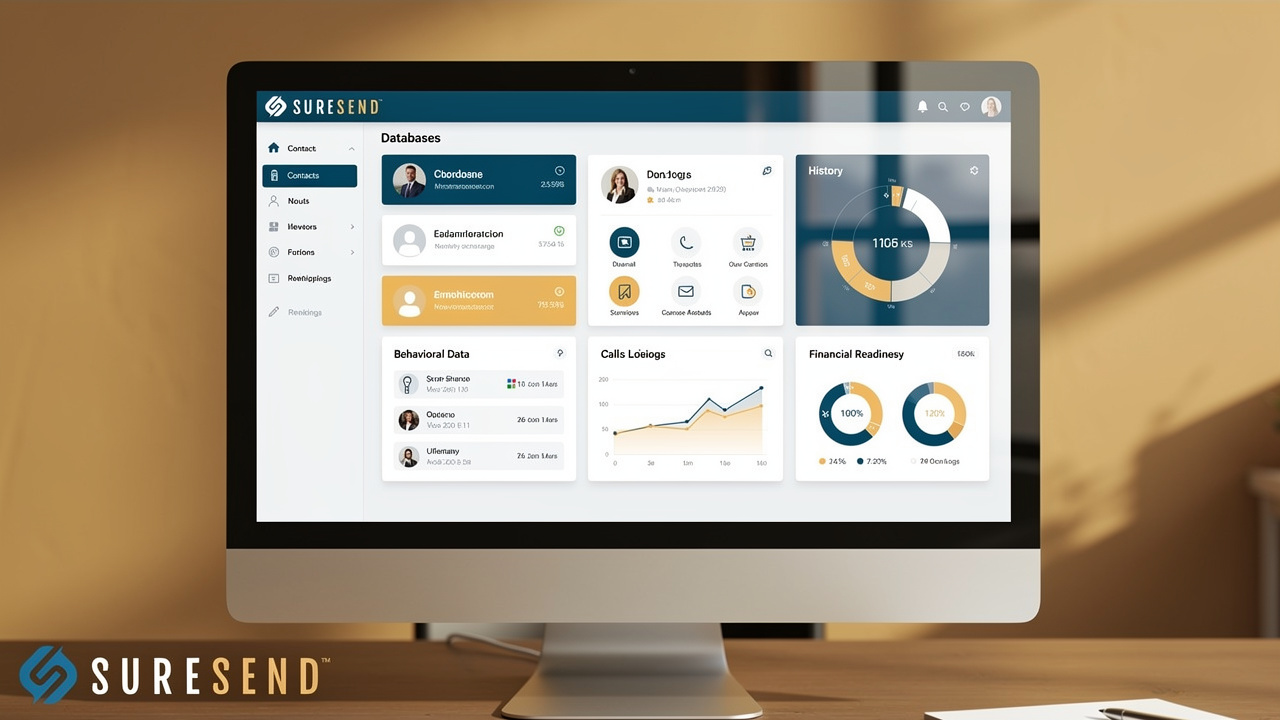
A real estate CRM collects far more than contact cards.
Think about it from your clients’ perspective, the activity and info in most real estate CRMs would allow someone to build a profile and contact info containing information such as:
Name
Phone number and email address
Budget and financial information: simply seeing the homes a person is searching for provides details about what their current home is worth and what they are considering buying
Family/personal relationships: A 30s-40s year-old person using an AVM on a 5 bedroom home and then searching for 1-2 bedroom condos in the same city could expose potential relationship changes.
It gathers a layered profile that mixes identity data with behavior, deal history, and your own activity inside the platform. The basic layer looks familiar: names, phone numbers, email addresses, and mailing addresses for every lead and client you’ve ever added.
Beneath that sits behavioral data your CRM logs automatically, including which listings a contact viewed, whether they opened your emails, how long calls lasted, and what was said in texts or voicemails. Layered on top of that is deal and transaction history, like offers made, properties toured, and closing dates, plus agent-side activity data such as your login times, call recordings, and private notes you’ve typed about a client’s situation.
Put together, this is a detailed record of financial readiness, timing, and personal circumstance, not just an address book. It’s worth remembering that this combination, contact plus behavior plus transaction history, is exactly what makes a database valuable to anyone who might want to use it beyond serving your clients.
Why This Data Is More Valuable Than Agents Realize
A contact list tied to behavior data isn’t just a list anymore, it’s a targetable asset. Someone who knows a contact’s browsing history, timeline, and price range can market to them with the kind of precision an agent spends years earning through relationships.
Call transcripts and texts often contain details agents don’t think of as sensitive data until something goes wrong. A client might mention a pre-approval amount, a divorce, a job loss, or even recite part of a Social Security number while confirming identity on a recorded call. Once that’s stored, it carries the same weight as any other personally identifiable information, whether your CRM treats it that way or not.
Who Can See Your Contacts Inside Your Own Team?
Inside your own brokerage, visibility usually comes down to how your CRM account is structured, not how private you assumed your pipeline was. Most platforms default to one of two models:
A shared team pool, where every lead is visible to everyone on the account.
Individually assigned contacts, visible only to the owning agent.
The catch is that brokers and account administrators frequently retain blanket access regardless of which model a team chooses, often without agents realizing it. That default setting creates a real and fairly common risk. A teammate browsing the shared pool can see contacts you built through years of referrals and past clients, and in some cases export or message them directly.
The scenario that worries agents most is departure risk, where a teammate leaving for a competing brokerage walks out with access to contacts that were technically visible to them the entire time, even if nobody intended it that way. This isn’t a hypothetical edge case; it’s a structural feature of how many CRMs handle team accounts by default, and it’s precisely why permission settings deserve attention before a problem forces the issue.
How Role-Based Permissions Should Work
Granular permission controls should let a manager decide exactly who sees which contacts, who can export data, and who can access call recordings versus just a log entry showing a call happened. Those are three separate permission levels, and a CRM that treats them as one setting isn’t giving you real control.
Sure Send’s real estate CRM features are one example of this done at a granular level, letting managers define visibility by team, by contact, or by data type rather than an all-or-nothing switch. The point isn’t which vendor offers this, it’s that this level of control is what to look for before you hand over your database to any shared account.
Who Can See Your Data Outside Your Brokerage?
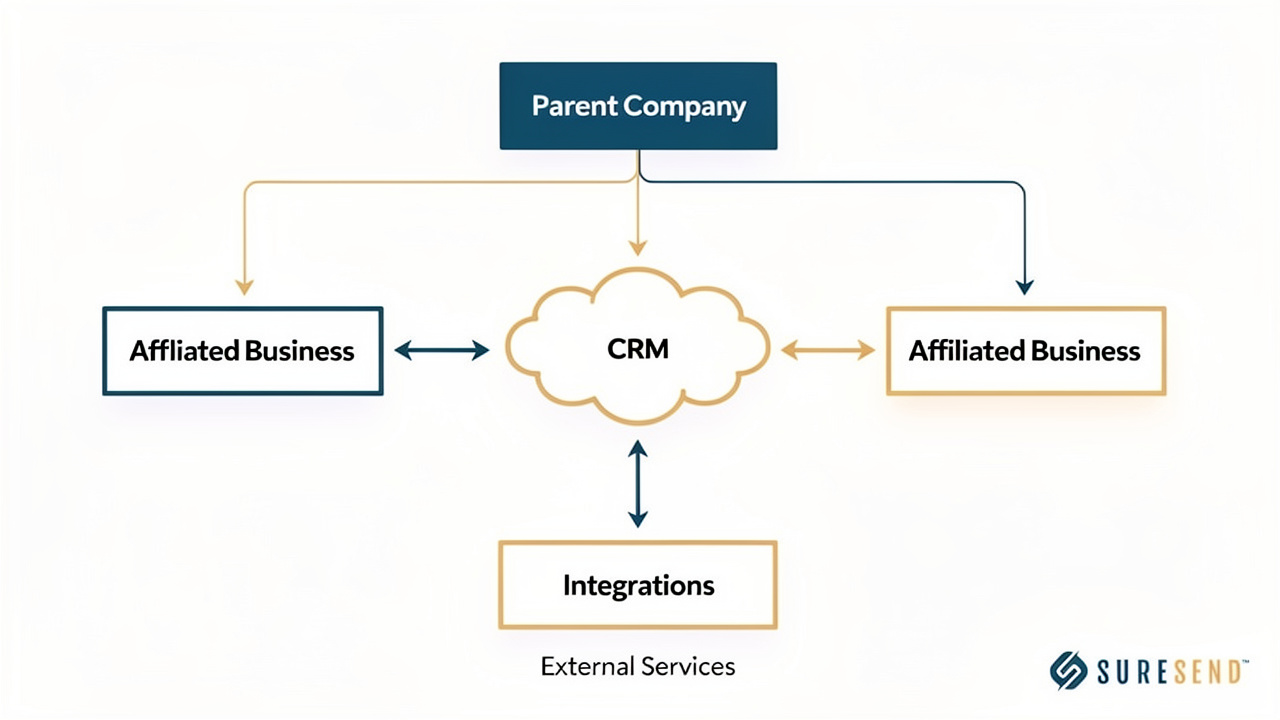
Beyond your own team, the bigger privacy question is whether your CRM vendor, or anyone connected to it, can use your contacts for something beyond simply hosting them. Storing your data is a basic function every CRM performs, your contacts have to live somewhere. Using or sharing that data is an entirely different question, and it’s the one that actually determines your privacy risk. A handful of parties realistically sit in this “outside your brokerage” category:
The CRM company’s own employees and support staff, who typically need some access to troubleshoot issues.
The CRM’s parent company, if one exists, which may or may not have its own commercial interest in your data.
Affiliated businesses under the same corporate umbrella as your CRM vendor.
Third-party integrations you’ve connected, like dialers, marketing platforms, or portals, each of which gains some slice of access the moment you authorize the connection.
None of these parties having access is automatically a problem. The problem is not knowing which ones have it, and under what terms.
Why a Parent Company Changes the Privacy Picture
When a CRM is owned by a larger platform, like a real estate portal, a franchise network, or a lead-generation company, that parent entity may have commercial reasons to access or use agent and client data that a standalone CRM vendor simply doesn’t have. A portal with its own consumer-facing products, for instance, might have an interest in contacts that could also become users of its other services.
This structure isn’t automatically harmful, and plenty of parent-owned CRMs operate responsibly. What it changes is the incentive picture, which makes the actual terms of service and privacy policy the deciding factor rather than an assumption either way. That’s exactly why reading those documents matters more than trusting a brand name, and it’s where the next section comes in.
How to Read Your CRM’s Privacy Policy and Terms

Reading a CRM’s privacy policy is less about legal training and more about knowing which five clauses actually matter, since the rest is mostly boilerplate.
Most agents skip straight to the “I agree” button because privacy policies read like dense legal filler, but the clauses that decide what happens to your contacts are usually short, specific, and easy to spot once you know where to look.
The first is data ownership, which states outright (or conspicuously doesn’t) whether your contact data belongs to you or the vendor, a responsibility that property services providers are formally expected to document under guidance on processing personal data from prospective purchasers during the sales process.
The second covers use by the vendor or its parent company, specifically whether there’s language permitting them to use your data for their own marketing or product development.
The third is affiliate sharing, meaning whether the policy names specific related companies it may share data with and under what conditions.
The fourth is anonymized or aggregated data use, a phrase that sounds harmless but often leaves room for broader use than agents assume.
And the fifth is what happens at account closure, covering whether you can export everything and whether there’s a real deletion timeline or the vendor simply keeps a copy indefinitely.
For a deeper look at how ownership clauses specifically get written and what to watch for, this guide on real estate CRM data ownership covers it in more depth than space allows here. In plain language, “aggregated and anonymized” data clauses often still allow a vendor to analyze patterns across thousands of agents’ pipelines, which isn’t necessarily dangerous, but it’s worth knowing it’s happening.
The Five Clauses to Find Before You Sign
Before signing anything, search the document (most are searchable PDFs or web pages) for these five specific terms, since scanning word by word wastes time a simple search can save.
Data ownership language should explicitly state the data is yours. If the policy stays silent on ownership or implies the vendor retains rights, treat that as a red flag worth asking about directly.
Vendor or parent company use clauses reveal whether your data can be used for the company’s own marketing, product testing, or unrelated business lines beyond serving your account.
Affiliate sharing sections should name the specific related entities data might flow to, along with the conditions, rather than using vague references to “partners” or “the family of companies.”
Anonymized or aggregated use clauses define what counts as anonymized, which matters because weak anonymization standards can still enable targeted use at scale.
Account closure terms should spell out a real export process and a stated deletion timeline, not an open-ended promise that data will be removed “eventually.”
Real Example: The Follow Up Boss / Zillow Privacy Policy Change
A concrete example makes these clauses easier to recognize in the wild, and Follow Up Boss offers a publicly documented one. Follow Up Boss, now operating under Zillow Group, updated its privacy policy with changes that took effect on November 15, 2025. Based on what’s been publicly documented, the update introduced two distinct data categories for contacts stored in the platform.
The first category, often described as mutual customer data, applies to contacts who also happen to have a Zillow account of their own. The second, an agent-only category, applies to everyone else in an agent’s database who has no separate relationship with Zillow’s consumer products.
This distinction matters as a case study because it shows, in a documented and specific way, how a parent company’s broader product mix can create different data-handling tiers within a single CRM. A contact’s data treatment can depend on whether that person separately overlaps with the parent company’s own user base, something an agent would have no way of knowing without reading the updated policy closely.
This is necessarily a brief look at one example; a fuller breakdown of how this specific policy works, and what it means for agents using Follow Up Boss, deserves its own dedicated treatment elsewhere rather than a few paragraphs here.
What Happens to Your Contacts If You Switch or Close a CRM?

Leaving a CRM is where data privacy stops being theoretical and starts affecting your actual business, since a messy exit can cost you years of relationship history. Some platforms make exporting your contacts genuinely difficult, either through incomplete export formats, missing fields, or processes that require the vendor’s active cooperation to complete. That dependency is the core of what’s often called platform risk, the possibility that a vendor’s choices, not your own, determine whether you keep access to your own book of business.
Before you’re ever in a position of needing to leave, it’s worth confirming three things about your current CRM:
Check what export format options exist and whether they include everything you’d actually need, not just a stripped-down contact list.
Confirm whether call recordings, notes, and full communication history export along with basic contact fields, since those often get left behind in a standard export.
Ask directly whether the vendor retains a copy of your data after you delete your account, since “deleted” doesn’t always mean “gone.”
Platform risk isn’t an abstract concern for real estate specifically, where entire careers run on relationship continuity built over a decade or more. A CRM that’s acquired, shuts down, or changes its pricing overnight can leave agents scrambling if export wasn’t verified in advance. This resource on CRM platform risk and this guide on choosing a CRM built for data independence both go deeper into evaluating this risk before it becomes a problem rather than after.
Treat export testing as a routine check, not a crisis response. Agents who confirm their export options when they first sign up rarely face a scramble later, while agents who wait until there’s a reason to leave often discover the limitations at the worst possible time.
What Rights Do You Actually Have Over Your Own CRM Data?
Your actual rights over your CRM data come from two very different sources, and most agents only think about one of them.
The first is state or federal privacy law, which varies significantly by state and was mostly written to protect consumers, meaning the clients in your database, rather than the agent managing that database.
The second source is whatever the vendor’s contract voluntarily grants you, which is where the real practical answer usually lives.
Here’s the uncomfortable reality behind that split. Because agents typically aren’t the “data subject” that consumer privacy laws like the California Consumer Privacy Act were built to protect, those regulations mostly govern how a company treats your clients’ data, not how it treats your access to your own book of business as an agent, a distinction similarly addressed in Canadian guidance on PIPEDA-compliant real estate technology, which walks agents through vendor questions on data residency and audit access.
That means the contract you sign with your CRM vendor, not state regulation, is usually what decides whether you can export everything, whether the vendor can market to your list, and what happens if you want to leave. This is exactly why the clauses covered earlier carry so much weight. They’re not just formalities sitting between you and account setup, they’re functionally the only rulebook governing your relationship with your own contact data in most cases.
Questions to Ask Before You Sign a New CRM Contract
A handful of direct questions, asked before you sign rather than after a problem surfaces, can reveal more than the privacy policy itself sometimes does.
Ask plainly, “Will you ever market to my database, or use it for your own promotional purposes?” A vendor confident in its answer will usually give you a direct yes or no rather than a vague reassurance.
Ask, “Can I export everything, anytime, in any format I need?” Watch for hedging around format limitations or cooperation requirements buried in the answer.
Ask, “Do you have a parent company, and what can that parent company access?” This single question often surfaces information the privacy policy states only indirectly.
Ask whether the privacy protection is a structural guarantee or just a policy promise. A structural guarantee, like a technical data firewall separating your account from affiliated entities, holds regardless of future policy changes, while a policy promise can be updated at the vendor’s discretion.
Frequently Asked Questions
Does My CRM Vendor Need My Permission To Use My Contact Data?
Permission is typically granted, if it is granted, the moment you accept the terms of service, not through a separate request later. That’s exactly why reading the data use and sharing clauses before you sign matters more than raising concerns after the fact, when your agreement may already allow what you’re objecting to.
Can My Broker See Every Contact In My CRM Account?
This depends entirely on account structure and permission settings, not a universal industry rule. Broker-owned accounts often grant default visibility across the whole team unless role-based permissions have been specifically configured to limit it, so check your account’s permission settings rather than assuming either way.
Is It Legal For A CRM To Sell Anonymized Real Estate Data?
In many cases, yes. “Anonymized” or “aggregated” data is commonly carved out of standard privacy restrictions in CRM terms of service, making this legal under most current frameworks. That’s precisely why this specific clause deserves closer scrutiny than agents typically give it when skimming a privacy policy.
What Happens To My Contacts If My CRM Company Gets Acquired?
An acquisition can trigger new terms of service or merge your data into the acquiring company’s existing practices, sometimes with little advance notice. Check your current contract’s change-of-control language now, before an acquisition happens, so you know what to expect if your vendor changes hands.
Should I Be Worried About CRM Integrations Seeing My Contact Data?
Every connected integration, whether a dialer, marketing tool, or portal, typically gains some level of access to your contact data once you authorize it. It’s worth periodically auditing which integrations are still active and whether each one is still necessary for your workflow.
How Do I Know If My Current CRM Already Shares My Data With Affiliates?
Check the privacy policy’s section specifically labeled “information sharing” or “affiliates,” since that’s where this disclosure is legally required to appear. If the language feels vague or overly broad, contact support directly and ask for a plain-language explanation of exactly who the policy covers.
The Takeaway
Real estate agent data privacy in a CRM is, in the end, a contract and architecture question, not simply a security question about firewalls and encryption. The clauses that decide who can see and use your contacts almost always sit in documents most agents accept without reading closely, which means the real protective work happens before you sign, not after a problem appears.
Make a habit of auditing your current CRM’s policy against the five clauses covered here, and ask the direct questions from this guide before committing to anything new. Treat structural guarantees, like a genuine data firewall separating your account from affiliated entities, as fundamentally stronger evidence of privacy than a policy promise that can be rewritten at the vendor’s convenience.

Written by