
Real Estate VoIP CRM Integration – Everything You Need to Know
Missing a buyer’s call during an open house costs real money, and most teams can’t pinpoint why it keeps happening. The real problem usually isn’t effort. It’s that the phone system and the CRM run as two separate tools that barely talk to each other, leaving gaps in the contact record every time someone picks up the line. VoIP CRM integration for real estate closes that gap by tying every call, recording, and disposition to the same contact the instant it happens.
Platforms that handle this most easily for call tracking and recording are the ones built with calling inside the CRM itself, such as Sure Send, rather than bolted on through a third-party connector. Research shows 88% of home buyers still rely on agents to guide their purchase, and the lead often goes to whoever answers the phone fastest, sometimes within minutes.
Add in that most agents spend their day at showings rather than a desk, and disconnected systems start to look expensive fast. This guide defines true VoIP CRM integration, shows how call data should move through your system, and explains how to spot a connector that won’t hold up under daily use.
Key Takeaways
A native, built-in calling system logs calls, recordings, and dispositions directly to the contact record, with no connector required.
Connector-based setups like Zapier often sync in one direction only, and they break the moment either platform updates its API.
Reps spend less time on admin and more time selling when call logging and task creation happen automatically.
Built-in DNC scanning, call transcription, and pre-call AI summaries cut compliance risk and prep time at the same time.
Open API and webhook support still matter, even with a strong built-in dialer, since teams need room to connect specialty tools.
What Is VoIP CRM Integration in Real Estate?
VoIP CRM integration in real estate connects an internet-based phone system directly to the CRM. Every call, text, and contact detail then lives in one record instead of three separate tools. VoIP, short for Voice over Internet Protocol, simply means calls travel over the internet rather than a traditional phone line, which makes it possible to route one call to a desk phone, a laptop, and a mobile app at the same time. The CRM half of that equation is the software storing every contact, note, and pipeline stage for a buyer or seller relationship.
The platforms that make this easiest for call tracking and recording are the ones built with the dialer inside the CRM from day one, such as Sure Send, rather than general business tools like Salesforce, HubSpot, or Zoho CRM that need a telephony add-on layered on top. Real estate-specific systems such as Follow Up Boss, BoomTown, kvCORE, and LionDesk also offer some native calling, though the depth of that connection varies widely between vendors.
A traditional setup keeps the phone system and the CRM as separate products, bridged only by manual note-taking or a thin connector passing a handful of fields back and forth. An agent on that kind of stack has to hang up, open the CRM, and type out what was discussed before moving to the next call, and that extra step is exactly where records go missing. True integration removes that step entirely, since the call itself becomes a CRM event, complete with a recording, a transcript, and a timestamp, the moment it ends. That single difference, whether the phone system feeds the contact record automatically or depends on someone remembering to update it, is what separates a usable real estate phone CRM from one that just adds friction.
How Call Data Should Flow Through Your System
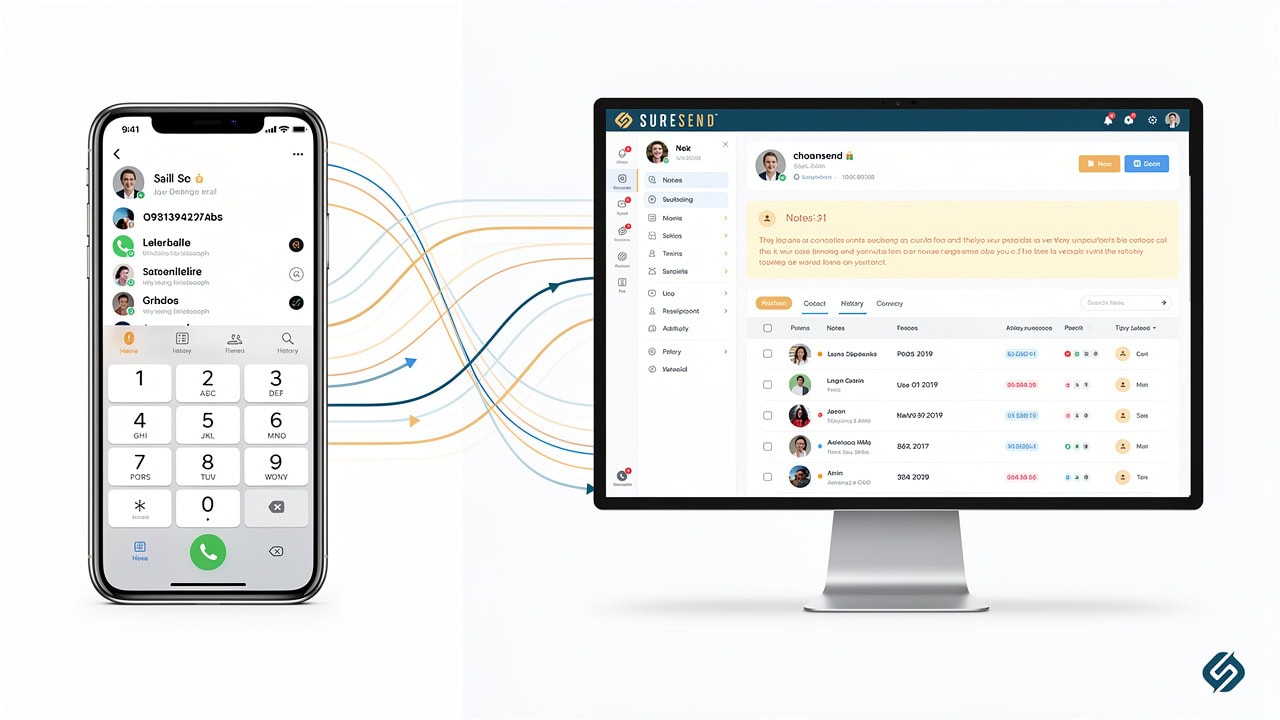
Picture the call flow end to end:
The phone rings, and the system matches the caller to an existing contact automatically.
Recording starts the moment the agent answers.
The agent logs a quick disposition, maybe “showing scheduled” or “needs follow-up,” and that single click updates the pipeline stage.
A transcript appears within minutes, attached to that same contact timeline alongside the recording and any notes typed during the call.
A task or reminder generates from the disposition without the agent opening a separate app.
None of this should require logging into a second tool or exporting a spreadsheet later. The contact record simply grows more complete with every call, which is what makes coaching and automation possible down the road.
Basic Connector vs. Deeply Integrated Calling: What’s the Real Difference?
A basic connector and a deeply integrated calling workflow look similar from the outside, but they behave very differently once a team is making fifty calls a day. A connector-style integration, the kind built through a tool like Zapier, typically passes a narrow set of fields between the phone system and the CRM: a phone number, maybe a call duration, sometimes a recording link. That connection often only moves data one direction, so a note an agent adds inside the CRM never reaches the dialer, and a disposition set during the call may not update the pipeline stage at all.
Connectors also depend on both platforms keeping their APIs stable. The moment either vendor changes a field name or retires an endpoint, the automation can fail quietly, and nobody notices until a manager goes looking for call records that were never logged.
A deeply integrated, native calling workflow works differently because the dialer and the CRM are built on the same underlying platform rather than stitched together afterward. Calls, recordings, transcripts, and dispositions sync in both directions in real time, and every field the CRM supports, property interest, transaction stage, prior notes, stays available to the call system and back again. Because one team controls both sides of that connection, there’s no outside API to silently break the link.
This is the distinction operations leaders should learn to spot first, since it determines whether a built-in dialer holds up once call volume climbs, or whether it quietly degrades until someone notices gaps in the contact history. Vendors marketing “VoIP integration” rarely explain which category they fall into, so the only reliable way to tell is asking whether the connection runs through a native API built by the CRM company itself, or through a third-party automation layer both systems happen to support.
Why One-Way Syncing and Manual Logging Quietly Break Teams

One-way syncing shows up as an incomplete contact record, where the CRM shows a call happened but not what was said or decided. Reps notice the gap quickly and start keeping their own notes on a sticky pad or a personal spreadsheet, because that at least feels reliable. Once that habit forms, the CRM adoption the single source of truth, and managers lose visibility into what’s actually happening on the phones.
Pipeline stages stop reflecting reality because nobody updates them consistently, and deals look stalled when they’re actually moving forward. Thin call data also can’t support real coaching or automation, since there’s nothing for a manager to review and nothing for a workflow to trigger from.
What’s in It for the Rep? Less Admin, More Context
The strongest argument for a real VoIP CRM integration isn’t a feature list, it’s what happens to a rep’s day once logging stops being manual. After-call admin, typing up notes, setting a follow-up task, updating a pipeline stage, is the single biggest reason reps stop using a CRM, even when they liked it on day one.
When the dialer and the CRM are the same system, dispositions, notes, and recordings attach to the contact automatically, and the rep moves to the next call instead of switching screens to log the last one. That handful of minutes saved per call adds up fast across a full day of dialing, and it compounds across a team of ten or twenty agents into hours of reclaimed selling time every week.
The other half of the equation happens before the phone even rings. A rep who sees the contact’s full history, every past call, every note, every property they viewed, starts the conversation already knowing what that person cares about, instead of asking questions the CRM already answered weeks ago. That context changes the tone of the call immediately; the lead feels remembered rather than processed, and the rep sounds prepared rather than scrambling.
Teams managing high call volume in real estate or residential lending tend to underestimate how much this matters, assuming the gap is a skills problem when it’s often a data problem. An agent with strong call technique still underperforms while dialing blind, and a newer rep with full context can often outperform someone more experienced who has none. This is the practical reason CRM phone integration for real estate deserves attention from sales managers, not just IT, since it affects quota attainment directly, not just administrative tidiness.
Before the Call: Why Context Changes the Conversation

The dollar value of a call converts at a low rate under the best conditions, with industry estimates placing dial-to-appointment conversion somewhere around 1.7% to 2.2%. Reps calling without any context are working against that number from an even worse starting position, since every call starts from zero and every objection feels new even when it isn’t.
Surfacing the last call’s notes, the contact’s stated budget, or the property they toured last week before the agent dials changes that math. The rep references something specific in the first thirty seconds, the lead recognizes they’re talking to someone who actually remembers them, and the call moves toward a next step instead of a repeat introduction.
How Sure Send Handles Calling and CRM Integration Natively
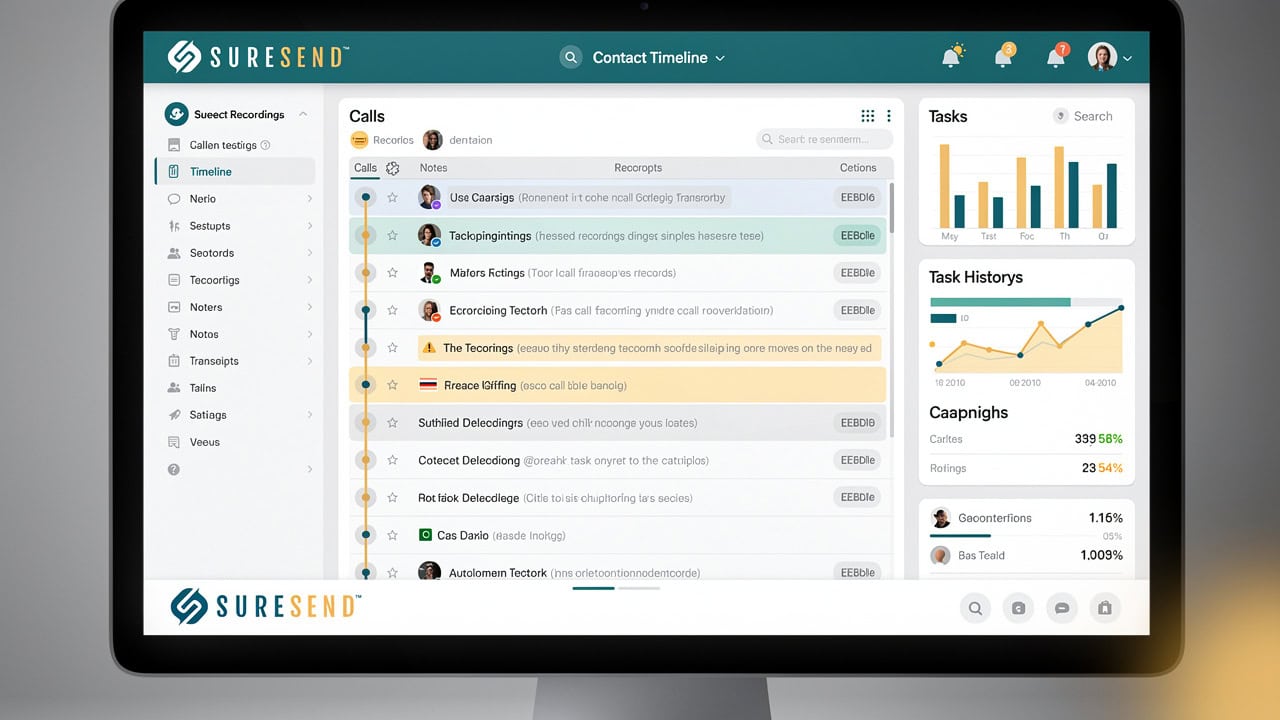
Sure Send is built around the idea that calling shouldn’t live in a separate app from the rest of the CRM, so the dialer sits inside the same contact record as every email, text, and note. The dialer itself opens as its own panel rather than a pop-up window, which means an agent can jot notes and set a disposition without losing their place on the call list they’re working through.
Every call made or received through the platform is logged automatically, complete with a recording and a timestamp, and attached directly to that contact’s timeline, so there’s no connector translating data between two separate products. Transcription runs on top of that recording, turning the conversation into searchable text within minutes, which matters for a team spending most of its day between showings rather than reviewing audio files at a desk.
Before the agent ever dials, the platform’s AI lead scoring generates a short summary pulling together the contact’s prior call history, recent property activity, and any notes left by teammates, so the rep walks in already knowing where things stand. After the call wraps, the system reviews the transcript and suggests the next logical action, a follow-up task, a scheduled appointment, an email draft, and the rep reviews and approves each suggestion rather than having anything added to the record without their sign-off.
That approval step matters for trust; the AI handles the preparation work, but the agent stays in control of what actually gets logged. Because the transcript lives inside the contact record rather than a separate recording archive, specific phrases and topics raised on a call can trigger downstream automation, a drip sequence pausing when a lead mentions they already made an offer elsewhere, for example, or a task firing when financing comes up mid-conversation.
Call lists that agents build for prospecting can be saved and resumed later, so a rep interrupted mid-session by a showing doesn’t lose their place and start over from the top. None of this requires IT involvement to configure or a developer to maintain, since the calling layer and the CRM are the same product rather than two products wired together after the fact.
DNC Scanning, Call Forwarding, and the Winning Formula
Outbound calling at real estate volume carries real Do Not Call compliance, and the platform addresses this through its ezVerify.ai integration, which flags numbers on the national DNC registry in real time and runs a full database scan every month. Call forwarding lets an ISA or receptionist answer first and transfer a live call straight to the right agent, without the lead having to redial or wait on hold.
Every logged call also feeds into the Winning Formula, the system behind the Win the Day dashboard, which converts raw calling activity into a real dollar value based on a rep’s own six-month conversion history. That turns call volume from an abstract metric into a number a rep and their manager can actually coach against.
Common Failure Points That Undermine VoIP CRM Integration
Even brokerages that invest in VoIP CRM software often end up with a system that technically works but quietly fails in practice, a pattern documented in a systematic literature review of real estate technology adoption, and it usually traces back to the same handful of causes:
One-way syncing is the most common, where calls flow from the phone system into the CRM but notes or disposition changes made inside the CRM never make it back to the dialer, leaving two versions of the truth.
Field mapping gaps are frequent too; a connector might capture call duration and a recording link but drop the disposition, the agent who took the call, or the property discussed, leaving the contact record technically updated but practically useless for coaching.
Fragile third-party APIs are exposed to changes neither vendor controls, so a routine update on either side can silently break the sync, and the first sign is usually a manager noticing call volume looks wrong in a weekly report.
Compliance gaps are the quieter risk; outbound calling without active Do Not Call screening exposes a brokerage to regulatory penalties, and relying on a rep to remember to check a list manually isn’t a sustainable control.
Poor adoption is perhaps the most common failure point of all. If logging a call still takes extra clicks or a trip to a different screen, reps eventually stop doing it consistently, and a system can have every feature imaginable and still fail if nobody actually uses it the way it was designed.
Does Every External VoIP Tool Fall Short?
External VoIP tools aren’t the problem by themselves, and plenty of well-built phone systems work fine for teams with the technical resources to maintain the connection properly. The real question is whether the integration runs through a native, two-way API that both companies actively support, or through a brittle connector nobody is watching.
This is also why open API and webhook support matter, even for a platform with a strong built-in dialer. Sure Send supports its own open API and Zapier for edge cases, which means a team isn’t locked out of connecting a specialty tool just because calling already works natively inside the CRM.
How to Evaluate a VoIP CRM Integration for Your Team

Evaluating a VoIP CRM that real estate teams can rely on long term means looking past the demo and asking how the system behaves once it’s handling real call volume under pressure.
Data sync direction does a note or disposition added inside the CRM ever make its way back to the phone system, or does information only flow one way from the dialer in?
Field coverage a system that only logs duration and a recording link isn’t giving managers enough to coach from; look for dispositions, transcripts, and notes all attached to the same contact automatically.
Recording and transcription should happen without extra setup per agent, and transcripts should be searchable rather than sitting as audio files nobody has time to listen through.
Compliance scanning deserves a direct question too: is Do Not Call screening built into the calling workflow itself, checking numbers in real time, or is it a separate subscription a brokerage has to remember to maintain?
Scalability matters just as much as any single feature, since a system that works cleanly for five agents can behave very differently once multi-location real estate teams, so ask how ring groups, call lists, and reporting hold up at a larger size.
Number portability is worth confirming early, particularly for brokerages moving off another Twilio-based platform, since losing an established business number during a switch creates its own kind of lead loss.
Open API or webhook support for anything the native integrations don’t cover, so a team with a specific tool in its stack isn’t stuck waiting on a vendor’s roadmap.
Questions to Ask Before You Sign
Before signing any contract, put these questions directly to the vendor and get specific answers, not marketing language, in return.
Does this sync both directions in real time, or only from the phone system into the CRM?
What happens to my call history and recordings if the connector or API link breaks?
Is Do Not Call scanning built into the dialer, or is that a separate tool I have to manage myself?
Can a rep pause a call list mid-session and pick it back up later without losing their place?
The Takeaway
The difference between a basic connector and a true VoIP CRM integration comes down to one question: does your calling data actually make the CRM smarter, or does it just sit there as a call log nobody checks? Native integration, where the dialer and CRM share one contact record, is what turns call activity into something a manager can coach from and a rep can build on, instead of just marking a task “done.”
Take a real look at your own call-to-CRM flow against the standards covered here: dispositions, transcripts, compliance scanning, and genuine two-way sync.
If gaps show up, a built-in system like Sure Send is worth a serious look before you invest in patching the one you already have.
Frequently Asked Questions
What Is the Difference Between VoIP and a VoIP CRM Integration?
VoIP is simply the calling technology, phone service delivered over the internet instead of a traditional phone line. A VoIP CRM integration is what happens when that calling technology connects directly to your CRM, so every call, recording, and disposition becomes part of the contact record automatically. Without that connection, VoIP is just a phone system that happens to run on the internet.
Can I Keep My Existing Phone Numbers When Switching to an Integrated System?
In most cases, yes. Platforms built on standard telephony infrastructure, including Sure Send, support number portability from other Twilio-based systems, so your existing business line can move over instead of forcing clients to learn a new one. Porting typically runs alongside setup, with your old number staying active until the transfer completes.
How Does Call Recording and Transcription Help With Coaching?
Recording and transcription give managers something concrete to review instead of relying on a rep’s memory of how a call went. When transcripts attach directly to the contact record, a manager can search for specific topics or objections across many calls at once, sales performance dashboards, and train new reps using real examples instead of scripts.
Is DNC Compliance Something I Need a Separate Tool For?
Not necessarily. cold calling compliance can be built directly into your CRM and calling workflow rather than requiring a standalone subscription. Sure Send, for example, includes Do Not Call screening through its ezVerify.ai integration, checking numbers in real time and running a full database scan monthly, so compliance happens as part of normal calling activity.
What Happens If My CRM’s Native Integration Doesn’t Support a Tool I Already Use?
A strong VoIP CRM integration should still leave room for edge cases. Open API access and webhook support let developers build a custom connection for a tool that isn’t natively supported, and Zapier remains available as a fallback for smaller or less common services. The goal is flexibility without forcing a team to abandon a tool it relies on.
How Long Does It Typically Take to Set Up a VoIP CRM Integration?
Most teams can expect initial setup within a few business days, though full rollout depends on number porting, which can take one to two weeks depending on your current carrier. Plan for agent training alongside the technical setup, and test call routing and logging thoroughly before the full team switches over.