
Call Data Gaps Between Systems? Your CRM Dialer Answer
A dialer that lives outside your CRM creates a quiet but costly problem: call data gaps separate your CRM and dialer, leaving reps without context and managers without visibility.
The short answer to whether you should consolidate your CRM and dialer or just add an integration is this: integrations patch the symptom, but consolidating the two into one system fixes the structural cause. Middleware connectors move some data between platforms, but they rarely do it live, completely, or in both directions. This article walks through why the gap happens at the architecture level, how it hurts the agent making the call before it ever reaches a manager’s dashboard, and what actually closes it for good, including how Sure Send approaches the problem with a dialer built into the CRM itself rather than bolted on from outside.
By the end, you will understand the mechanics behind missing call logs, why real estate teams feel this pain more acutely than most industries, and what warning signs tell you your current setup is already leaking data. Keep reading to see the fix in practice.
Key Takeaways
Call data gaps start as a structural mismatch between two separate systems, not a discipline problem your reps can fix by trying harder.
The agent making the call feels the damage first, through lost context and repeated questions, before it ever shows up in a manager’s report.
Middleware tools like Zapier-style connectors create one-way syncs that go stale, instead of a live, shared record of every call.
Sure Send’s built-in dialer logs transcripts, dispositions, and outcomes directly into the same system that drives coaching, automation, and the Winning Formula.
What Causes Call Data Gaps Between a Dialer and a CRM?

Call data gaps between a dialer and a CRM happen because the two systems store information in different databases with different field structures and different sync schedules, so a completed call does not automatically land where the agent or manager expects to find it. This is the root cause behind nearly every complaint about call logs missing from a CRM, call data not syncing, or a real estate built-in dialer falling out of step with each other. A standalone dialer tracks its own version of a contact, built around dial counts and disposition codes. The CRM tracks its own version, built around pipeline stage, transaction status, and relationship history. When these two records are not actually the same record, something has to translate between them, and that translation step is exactly where data gets lost, delayed, or dropped. Middleware connectors, the kind of tool many teams lean on to bridge a dialer and a CRM, only move data within the specific fields and triggers they support. They often create a one-way sync, where the dialer pushes updates to the CRM but the CRM never pushes context back, and that sync can go stale the moment either platform changes its structure or releases an update. The result is a connection that looks functional on day one but quietly breaks down as both tools evolve independently of each other.
How Disconnected Systems Break the Flow of Call Information
Disconnected systems break the flow of call information by trapping the richest details, like transcripts, dispositions, and agent notes, inside the dialer instead of writing them to the shared contact record. A rep might type a careful note about a lead’s financing timeline directly into the dialer, only to have that note stay there permanently while the CRM shows nothing beyond “call completed.” Over time, this creates a contact record that looks active on paper but is actually missing the substance of every conversation that built the relationship.
Sync delays compound the damage further, since most connector-based setups update on a schedule rather than instantly. A manager checking the pipeline at 9 a.m. might be looking at data that reflects calls made before 7 a.m., with the morning’s actual activity invisible until the next scheduled sync runs. For a fast-moving real estate pipeline, that lag can mean a lead gets a duplicate call from two different agents on the same morning.
Why Does This Matter First for the Agent Making the Call?
This matters first for the agent making the call because they are the one who loses context mid-conversation, repeats questions a lead already answered, and gets weaker guidance on what to do next, long before any manager notices a reporting problem. It is tempting to treat call data gaps as a back-office issue, something that shows up in a monthly report and gets fixed by an operations person. In practice, the damage starts the moment a rep picks up the phone without the full picture of what happened last time. An agent who does not see that a lead already discussed financing, already raised an objection about price, or already asked to be called back next Tuesday is forced to either guess or start from zero. Guessing damages trust with the lead. Starting from zero wastes the time of both the agent and the prospect, and it signals, however unintentionally, that nobody on the team is actually tracking the relationship. On top of the conversation itself, the agent then has to handle the administrative cleanup that a disconnected system demands: manually logging the outcome, re-typing notes that were already captured in the dialer, and updating the pipeline stage by hand. That extra work does not just cost minutes. It pulls the rep out of a calling rhythm, delays the next dial, and over a full day of prospecting, adds up to meaningfully fewer live conversations than a rep working from a unified system would get.
What Happens When a Rep Loses Call Context Mid-Pipeline
A rep loses call context mid-pipeline when a returning lead calls back and reaches a different team member who has no record of what was already discussed. Picture a lead who spoke with one agent about a listing on Monday, raised a specific concern about the HOA fees, and then called the office back on Thursday only to reach a second agent. If that Monday conversation never made it into the CRM in full detail, the Thursday agent has no way to pick up where things left off, and the lead is forced to explain the same concern twice.
Manual logging after every single call creates a second, quieter form of context loss. Each time a rep stops to retype a disposition or rebuild a note that already existed somewhere in the dialer, they switch out of selling mode and into administrative mode. Doing that dozens of times a day does not just cost time; it breaks the momentum that keeps a calling session productive from the first dial to the last.
How Do Call Data Gaps Compound at the Team Level?

Call data gaps compound at the team level because incomplete call logs make activity reporting unreliable, which leaves team leaders guessing at who is actually working their pipeline and who only appears busy on paper. A manager who cannot trust the call history in the CRM has no honest way to sales team accountability volume from agents whose activity never made it into the system in the first place. That uncertainty bleeds into forecasting, since a pipeline built on partial call data will always understate or overstate what is realistically likely to close in a given month, a dynamic documented in call center data analysis research examining how agent behavior and customer patience data get modeled and validated. It also bleeds into accountability conversations, since a team leader cannot coach performance they cannot see clearly.
Coaching itself suffers the most visible damage, because CRM for sales managers depends on specific evidence, not general impressions. A manager who wants to help a rep improve objection handling needs the actual transcript of a call where the objection came up, not a secondhand summary typed in haste after the fact. When that transcript lives only inside the dialer and never reaches the CRM, the coaching conversation becomes vague by necessity, built on “I think you could have handled that better” instead of a specific moment the manager can point to and work through together. Across a full team, these small, repeated gaps add up to a coaching program that runs on guesswork rather than data, even when the underlying call volume looks healthy on the surface.
Why Real Estate Teams Feel This More Than Other Industries
Real estate teams feel call data gaps more acutely than most industries because the business depends on fast follow-up and personal rapport, both of which collapse quickly when call history goes missing. A lead who how often to follow up, or who gets a call from an agent that clearly does not remember their last conversation, often moves on to another agent who seems more organized. Relationship-driven sales cycles simply have less room for the kind of friction that incomplete call records create.
High call volume per agent magnifies the problem further, since real estate agents and daily habits of agents of calls a day across an active pipeline. A small sync failure that might go unnoticed at low volume becomes a daily, compounding data loss when it repeats across every call, every agent, and every lead source running through the team’s dialer.
Does Call Data Not Syncing to the CRM Hurt Automation and Follow-Up?
Call data not syncing to the CRM directly breaks automation and follow-up, because workflows that are supposed to trigger off a call outcome, like a stage change or a follow-up text, simply never fire if the dialer and CRM are not sharing live data. A disposition like “interested, send more info” is only useful to an AI lead scoring if the CRM actually receives that disposition the moment the call ends. When the dialer logs the outcome internally but the sync takes hours, or never happens at all, the text message scripts that was supposed to go out within minutes either arrives late or never arrives. From the lead’s point of view, that delay can look like indifference, even when the team’s intention was to follow up immediately.
The damage goes beyond a single missed trigger, because automation and AI tools depend on accumulated data to get smarter over time, much like research on AI-driven churn modeling in telecommunications shows how predictive systems rely on complete historical customer interaction data to perform well. Without captured transcription content flowing into the CRM, there is nothing for a system to learn from. Automated follow-up messages stay generic instead of referencing what the lead actually said, and suggested next steps stay vague instead of reflecting the specific conversation that just happened. Over months, this turns what should be an increasingly personalized follow-up system into one that never improves past its starting point, because the raw material it needs, the actual call content, never reaches the place where the automation lives.
What Are the Warning Signs Your Dialer and CRM Are Out of Sync?
Warning signs that your dialer and CRM are out of sync usually show up first as missing or delayed call logs, where a call you know happened this morning is nowhere to be found in the CRM an hour later. These symptoms tend to start small and easy to dismiss, then grow more obvious as a team scales its calling volume. Catching them early saves a team from months of unreliable reporting and frustrated agents. A few checks worth running on your own stack this week can reveal how serious the gap already is.
Pull up a contact you know was called in the last hour and check whether the CRM shows the call at all, along with its duration, disposition, and any notes the agent entered during the conversation.
Compare the pipeline report a manager reviews each morning against the actual number of calls made by each agent the day before, looking specifically for a gap between what was dialed and what was logged.
Search for clean a real estate database across the dialer and CRM, since conflicting phone number formats or mismatched last-contact dates are a common sign that the two systems are not sharing a single source of truth.
How Sure Send Closes the Call Data Gap With a Built-In Dialer
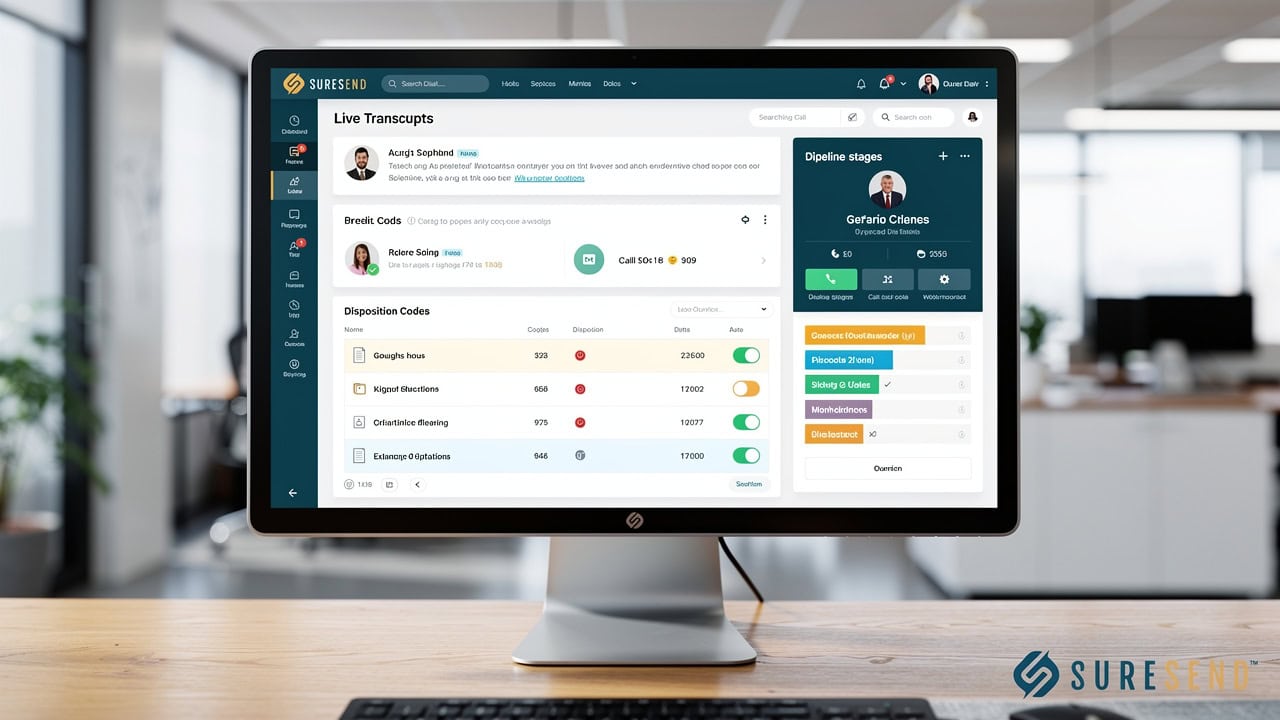
Sure Send closes the call data gap by running the dialer inside the CRM itself, so every call, transcript, and disposition real estate CRM features record instead of passing through a separate system and a middleware handoff. This is the structural difference that distinguishes consolidation from integration. An integration, no matter how well built, still connects two separate databases that each have their own rules, their own update schedules, and their own blind spots. This approach removes that separation entirely, so there is no handoff step where data can get lost, delayed, or watered down to fit a connector’s limited field mapping.
When a rep finishes a call inside the platform, the transcript is captured automatically and linked to the contact record in the same motion, without the agent needing to copy anything from one screen to another. That transcript does not just sit there as an archive. It feeds the system’s automation rules and future prompts, so the AI layer actually has real conversation content to work from rather than a bare disposition code. Post-call AI action suggestions then present the agent with a recommended next step, whether that is a follow-up text, a scheduled callback, or an updated pipeline stage, and the agent simply reviews and approves it rather than re-entering the same information by hand. This single shift, moving from manual data entry to review-and-approve, is what turns a call data gap into a closed loop, where the conversation that just happened becomes immediately useful to the next action the system takes.
What Happens to Call Data the Moment a Call Ends
The moment a call ends in Sure Send, the dialer panel, which sits separately from the contact record while the call is active so agents can take notes and set a disposition without losing their place mid-conversation, hands off that information directly into the same system that manages the pipeline. There is no export step, no waiting for a scheduled sync, and no second application to open. The pipeline stage updates automatically based on the outcome of the call, and the next recommended action appears directly in the rep’s Take Action list, ready to execute without requiring the agent to remember it on their own.
Because call lists in the platform are buildable, savable, and resumable, an agent can pause a calling session partway through a list and return later without losing their place or re-sorting through real estate database software. That continuity matters just as much as the data itself, since a rep who has to rebuild their calling queue from scratch every session loses time the same way they would if their call notes had simply disappeared.
How Does a Unified System Power Better Coaching and Reporting?

A unified system powers better coaching and reporting by giving managers a sales performance dashboards directly to revenue, instead of forcing them to stitch together five partial reports from separate tools. When call data, pipeline stage, and performance history all live in one place, a manager can see at a glance not just how many calls a rep made, but what those calls were actually worth.
The Winning Formula supports this by using a six-month rolling average of a rep’s own conversion history to assign a real dollar value to each call, each appointment set, and each lead worked, turning raw activity into a figure that actually means something to the business. This matters because activity counts alone have always told an incomplete story. A rep who makes 40 calls a day but converts poorly is not necessarily more valuable than a rep who makes 25 calls and converts well, and a unified system is what makes that distinction visible instead of hidden inside separate, disconnected reports.
Coaching benefits just as directly, since call transcripts linked to the contact record give a manager the raw material for a specific, evidence-based conversation instead of a vague impression. Rather than telling a rep “work on your objection handling,” a team leader can point to the exact moment in an actual transcript where a specific objection came up, discuss what was said, and work through a better response together, grounded in a real conversation rather than guesswork.
A manager who cannot see the actual conversation is left coaching the rep’s memory of the call, not the call itself.
Why Direct Integrations Matter More Than Connector-Based Fixes
Direct integrations matter more than connector-based fixes because they maintain a live, two-way relationship between systems instead of the one-way, field-limited handoff that most middleware tools provide. A connector like a generic automation tool can only move data within the specific fields and triggers it was built to support, and it typically pushes information in one direction without pulling fresh context back from the destination system, a limitation outlined in CRM dialer integration troubleshooting guidance covering common sync failures between connected platforms. That limitation is exactly why dialer CRM integration problems tend to resurface over time even after a team thinks they have solved them with a connector.
Sure Send’s architecture favors direct, native, API-level connections with IDX integration guide, transaction management tools, lead sources, and messaging apps, rather than depending on connector-based middleware as the primary method of keeping data current. This approach lets contact and call records stay accurate on both ends of a connection, since a direct integration can access more of each platform’s actual data structure instead of the narrow slice a generic connector supports. Zapier remains available within the platform for edge cases and smaller services that do not yet have a native connection, which keeps the system flexible without making middleware the default answer to every integration need. For technical teams that want to go further, an open RESTful API and webhooks are also available, so developers can sync call data into internal systems or build custom workflows without losing the context that a thin connector would otherwise strip away.
The Takeaway
Call data gaps between a dialer and a CRM are a structural problem built into how two separate systems store, schedule, and translate information, not a sign that your reps need more discipline or better habits. Every symptom this article has covered, from missing call logs to stale pipeline reports to generic follow-up messages, traces back to the same root cause: two databases trying to stay in sync without actually sharing one architecture. Closing that gap for good means putting the dialer, call transcription, coaching, and automation consolidate sales marketing tools rather than asking a connector to bridge them after the fact. That is the specific problem Sure Send was built to solve, by running calling as a native part of the CRM instead of a separate tool patched in from outside, so every conversation becomes data the rest of the platform can actually use.
Frequently Asked Questions
Why do my call logs disappear or never show up in my CRM?
Call logs usually disappear because they get captured inside the dialer’s own database and never transfer to the CRM, since the two systems don’t share a live connection. Most setups rely on batch-based syncing on a schedule rather than instant logging, so a call made between sync windows can sit invisible in the CRM until the next update runs, if it transfers at all.
Can I fix call data gaps without switching my whole CRM?
You can reduce some friction with a tighter middleware connection, but a connector alone rarely eliminates the root sync delay. Middleware still depends on scheduled updates and limited field mapping between two separate databases, so while it may help temporarily, only a dialer built directly into the CRM removes the gap at its source.
How do I know if my dialer and CRM are actually integrated or just connected?
Run a simple test: check a call logged five minutes ago and see whether the CRM already shows the full transcript and disposition, not just a basic log entry. If the information is partial or delayed, you likely have a thin data handoff rather than true integration, since real integration means shared architecture, not a one-way feed.
Does call recording and compliance tracking get affected by data gaps too?
Yes, compliance tracking can fragment the same way call logs do when do-not-call scanning and recording disclosure live on a separate system from the dialer. Built-in compliance tools tied directly to the dialer, rather than synced in from elsewhere, avoid that separate-sync risk and keep your compliance record as complete as your call record.
What’s the fastest way to spot a sync problem on my team this week?
Compare this morning’s actual call count per agent against what your CRM dashboard reports for the same period. If the numbers don’t match, or if you spot duplicate contact records for the same lead across your dialer and CRM, you’re looking at a live sync problem worth addressing immediately.
Will switching to a built-in dialer disrupt my team’s current workflow?
The goal of a built-in dialer is removing steps, like manual logging and switching between apps, not adding new ones for your team to learn. Features like call lists that save and resume automatically mean agents keep working through their queue without rebuilding anything, so the transition should feel like less friction, not more.