CRM Pricing Comparison: Costs of Top Platforms
Choosing between CRM plans on a tight budget can feel confusing. A clear CRM pricing comparison is the fastest way to cut through the noise. For most small businesses, the sweet spot is an entry plan around 10 to 30 dollars per user each month, or a focused free tier while the team is very small.
The real decision is which platform delivers the automation, email tools, and integrations you need at that price without surprise add-ons. This guide explains how CRM pricing works, compares Sure Send, Zoho, HubSpot, Salesforce, Pipedrive, and monday, and shows which tiers fit lean budgets. You will also see how hidden costs change the real monthly total.
Keep reading to understand the pricing models, scan the comparison table, and match a plan to your team, not just your wallet.
Key Takeaways
These points frame the rest of this CRM pricing comparison. Use them as a checklist while you read.
Per-user pricing scales fast. A small gap in price (even five dollars per user) becomes serious as you add seats. Small teams should decide on a realistic seat count before picking a plan.
Annual billing usually drops the rate. Price sheets from tools like Zoho and HubSpot show discounts between roughly ten and thirty percent on yearly contracts, so always compare the annual rate.
Hidden fees can change the real bill. Add-ons for AI, storage, phone support, or marketing automation often sit behind separate price tags. A good CRM cost comparison always includes these line items.
“Best value” depends on your team. SMBs care most about features reps actually use at a fair, predictable price. Large enterprises focus more on deep customization and complex territory rules. The same CRM can be perfect for one group and too heavy for another.
Sure Send bundles more into one plan. Sure Send brings AI, email deliverability, and automation into a single platform instead of stacking upsells. That one bill replaces stitched-together tools and middleware, cutting total cost of ownership while giving reps a system they can live in every day.
“Price is what you pay. Value is what you get.” — Warren Buffett
How Does CRM Pricing Actually Work?
CRM pricing is usually a recurring subscription that tracks the number of users on your team. For a small business with a tight budget, most starter CRM plans sit between 10 and 30 dollars per user each month on annual billing. Reviews from software marketplaces like Capterra show those ranges are now standard for SMB-focused tools. Understanding the pricing model behind the number helps you compare different offers on equal terms.
Most vendors follow one of three structures. Each one affects how your spend grows as the team scales. Here is how they differ for any CRM pricing comparison.
Per user per month is the classic SaaS approach where every rep needs a license. This model is simple to predict and common with Salesforce, Zoho CRM, Pipedrive, and monday. It works well for teams that add or remove seats often.
Flat rate plans charge one amount for a block of users or features, rather than counting each person. This shows up more in enterprise bundles and some HubSpot packages. It can cut costs for larger teams that use many hubs or products together.
Modular or hub-based pricing splits tools by function such as sales, marketing, and service. HubSpot and Microsoft Dynamics follow this pattern at higher tiers. It gives flexibility but also makes a CRM cost comparison harder because add-ons change the math.
Billing cycle also matters. Public price sheets from Zoho and HubSpot show annual billing often lowers the effective monthly rate by twenty to thirty percent. Typical ranges by company size now look like this for sales-focused CRMs: around 10 to 30 dollars per user for small teams, 40 to 100 for mid-market, and 150 or more for enterprise. For a lean small business, that first band is your main target.
What Hidden Costs Inflate Your Real CRM Monthly Cost?

The real monthly cost of a CRM almost never matches the headline price on the pricing page. Hidden items such as add-ons, usage overages, and paid onboarding can turn a twenty dollar seat into a much larger bill. Looking for these line items is a key step in any honest CRM software pricing comparison.
Several categories drive these surprises. Many platforms gate automation, AI, phone support, or advanced reporting behind higher tiers or paid modules. According to Zoho, extra file storage can cost around 275 dollars per month for each additional 5GB on some plans, which adds up fast for attachment-heavy teams. On top of that, tools that rely on Zapier or similar middleware for basic integrations add yet another subscription to your stack.
Add-on modules often include advanced AI, marketing automation, outbound calling, or analytics packs. These features may matter more to revenue than the core contact database. When they sit behind separate price tags, your CRM price comparison chart needs to account for those upgrades, not just the starter tier.
Support and implementation also change the final number. Some CRMs limit phone support to higher plans, and enterprise tools may expect paid professional services just to get configured. Those hours cost real money and can rival the software subscription during the first year.
Middleware and integrations create a third layer of expense when the CRM lacks direct native connections. Paying for Zapier or similar tools for every critical workflow makes the stack fragile and more expensive, a pattern explored in research on “Trends in Industry Support for pricing-driven DevOps in SaaS” that highlights how middleware dependencies quietly inflate total subscription costs. Sure Send avoids this by shipping with 30-plus direct integrations and an open API, so you are not forced into external bridges for core workflows.
“You can’t manage what you don’t measure.” — Peter Drucker
CRM Software Pricing Comparison: Top Platforms Side By Side

This section gives a practical CRM pricing comparison across leading platforms, focused on small and mid-sized businesses. You will see starting prices, mid-tier costs, and top levels for teams that need more depth. Use it alongside your own headcount and feature list to choose a smart fit.
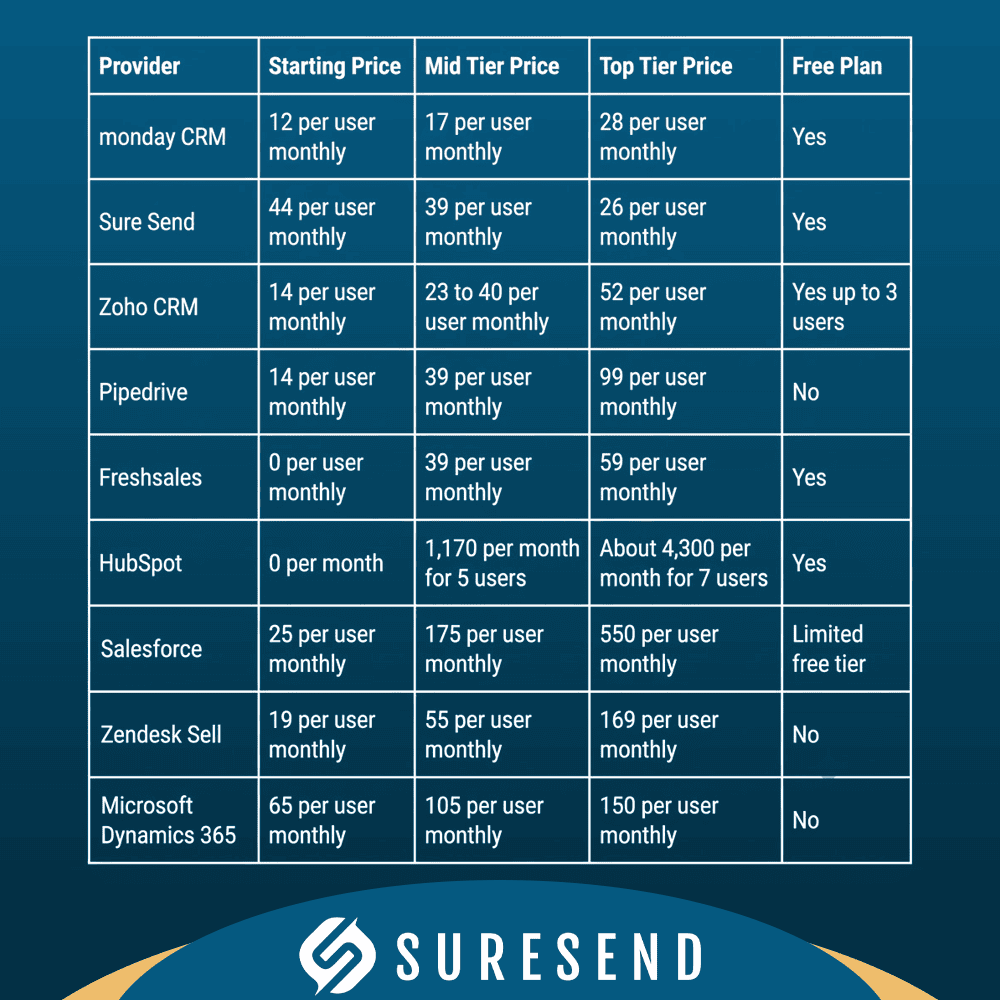
These numbers set the stage, but the real value comes from how each vendor structures features across tiers. According to Statista, Salesforce holds around 23 percent of the global CRM market, yet smaller tools like Sure Send, Zoho, and monday often offer a better feature-to-price ratio for SMBs. Now look at each major option in more detail.
Sure Send – AI First CRM Built For SMBs That Want Full Value Without The Upsells
Sure Send positions itself as the CRM your team will actually use, not just the one leadership buys. Instead of scattering features across a tall pricing ladder, Sure Send includes AI, automation, and email intelligence in the core platform. That means small businesses do not pay extra just to get practical tools like next-best-action suggestions or a drag-and-drop automation builder.
Key elements that stand out in most CRM software cost comparisons include:
The Win the Day dashboard, which makes daily activity simple by showing each rep exactly which calls, emails, and follow-ups matter now.
The Take Action automation, which surfaces contacts who are slipping through the cracks, so no warm lead goes cold.
An in-house email delivery stack, rather than a generic relay, which helps protect sender reputation from day one.
An open API, Model Context Protocol support, and 30-plus direct integrations, which remove the need for layers of middleware for common sales workflows.
Customer stories show how this affects real budgets. One business that previously relied on HubSpot and several add-ons cut about 39,000 dollars per year by moving to Sure Send, without losing any active capabilities. That kind of savings comes from collapsing separate tools and avoiding premium AI upsells, not from stripping features. For small and mid-sized teams looking for affordable CRM options with AI included, Sure Send deserves a place near the top of any CRM software cost comparison.
“The best CRM is the one your team actually uses every day.” — Common sales saying
Zoho CRM – 0 To 52 Per User Monthly Annual Billing
Zoho CRM is a favorite in many CRM comparisons for one simple reason: strong functionality at low entry prices. The free plan supports up to three users with leads, contacts, deals, basic workflows, standard reports, mobile apps, and 5,000 API calls per day. That makes it a realistic starting point for solo operators and micro teams.
Paid tiers stay friendly to tight budgets:
Standard at 14 dollars per user each month on annual billing adds sales forecasting, calendar booking, email integration, multiple pipelines, and ten custom dashboards.
Professional at 23 dollars per user adds Blueprint process automation, inventory tools, and more automation rules.
Enterprise at 40 dollars per user introduces the Zia AI assistant, territory management, portals, and a sandbox.
Ultimate at 52 dollars per user pushes feature and API limits higher and includes migration help plus custom AI models.
For most small businesses, Standard is the best value CRM tier because it covers pipeline tracking, email, and reporting at a very low seat cost. The main limitation is that Zia AI only appears at Enterprise and above, so AI-heavy teams must accept a jump in price. Zoho also charges for data storage overages, which matters if your team stores many files or long histories.
HubSpot CRM – 0 To 4,300 Plus Per Month
HubSpot offers one of the most generous free CRM tools on the market, with unlimited users and solid contact and deal management. Its free tier works well for early-stage startups that want clean records, basic email tracking, and simple reporting. The tradeoff is that HubSpot branding appears in many outputs, and automation stays limited.
The Starter Customer Platform at 15 dollars per user each month on annual billing bundles core CRM, light marketing, and service tools. From there, pricing jumps sharply:
The Professional Customer Platform costs about 1,170 dollars per month for five users and adds advanced automation and custom reporting.
Enterprise lands around 4,300 dollars per month for seven users with deeper AI, governance, and custom objects.
Individual hubs like Sales Hub and Marketing Hub add more complexity, with Sales seats often priced between 90 and 150 dollars per user.
For marketing-heavy teams with healthy budgets and dedicated ops staff, HubSpot pricing can make sense. For many small businesses running a CRM cost comparison chart, the leap from Starter to Professional feels steep, and some find they pay for marketing scale long before it is truly needed.
Salesforce – 25 To 550 Per User Monthly
Salesforce Sales Cloud is the standard reference in many CRM system price comparison articles, especially at enterprise level. The Starter Suite at 25 dollars per user each month covers basic lead management, email integration, and scheduling for small teams. Pro Suite at 100 dollars per user adds forecasting, custom reports, and quoting.
The Enterprise plan at 175 dollars per user is where meaningful automation and deep customization open up. Above that, Unlimited at 350 dollars per user brings AI-driven lead scoring, advanced deal health insights, and premium support. Einstein 1 Sales sits at the top around 550 dollars per user with performance management features and data cloud integration. Research on The Enterprise CRM Decision: aligning Salesforce and Dynamics 365 with business strategy highlights Salesforce for its breadth, yet that power comes with higher costs and more complex setup. For many SMBs, Salesforce editions comparison work shows they pay for scale they may not touch for years.
Pipedrive – 14 To 99 Per User Monthly
Pipedrive focuses on pipeline-driven sales teams that want a simple interface. The Lite plan at 14 dollars per user each month on annual billing offers custom pipelines, custom fields, AI-created reports, and insight dashboards. It already feels more sales-focused than some generic CRMs at similar prices.
The Growth plan at 39 dollars per user adds two-way email sync, workflow automations, sequences, and forecast views, which is why many reviewers call it the best value tier. Premium at 59 dollars folds in LeadBooster, lead scoring, contracts, and e-sign tools, while Ultimate at 79 dollars adds advanced security and data enrichment. The main gaps show up in customer service and onboarding use cases because Pipedrive does not include native ticketing or help desk tools. Phone support also lives at higher tiers, which matters if your team leans on live help.
monday CRM – 0 To 28 Per User Monthly Annual Billing
monday CRM starts with a lightweight free plan for two users focused on basic contact visualization. This suits very small teams that need a shared board but not yet a full CRM. As needs grow, monday keeps prices low compared with many rivals in this CRM pricing comparison.
The Basic plan at 12 dollars per user each month includes unlimited contacts, a mobile app, and 5GB of storage.
Standard at 17 dollars per user adds Gmail or Outlook email sync, invoice creation, and duplicate merging, which makes it the best value choice for most small teams.
Pro at 28 dollars per user brings sales forecasting, mass emails, and automation features.
Enterprise uses custom pricing with lead scoring and advanced analytics.
The main tradeoffs are limited preset lead scoring and lack of rich email drip campaigns on lower tiers, even though there are more than 150 integrations in its marketplace.
Free CRM Plans vs. Paid Plans: What Do You Actually Get?

Free CRM plans can be a smart entry point when cash is tight and headcount is small. They allow you to test workflows, learn a user interface, and see whether reps adopt the system before paying anything. The catch is that free tiers nearly always cap users, automation, and reporting, so they rarely support a growing sales team for long.
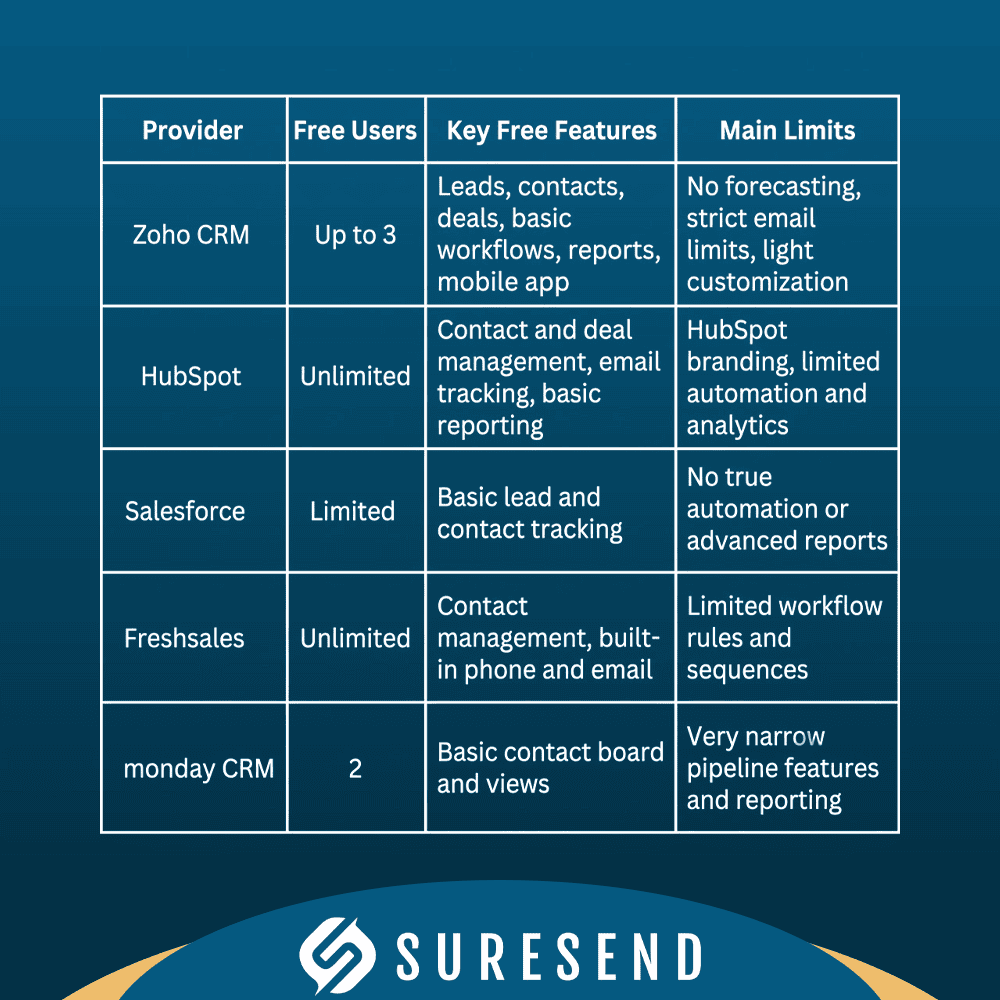
For solo operators and micro teams, these free plans are often enough for the first few months. According to HubSpot, many users start on free tools and upgrade only once automation becomes pressing. When you need AI-driven insights, deeper integrations, and reliable email sequences, though, paid plans earn their keep quickly.
Most major CRMs, including Sure Send, Salesforce, HubSpot, Zoho, Pipedrive, monday, and SugarCRM, also offer time-limited free trials or guided demos, often ranging from seven to thirty days without a credit card, so you can test full feature sets before paying. Sure Send does not live in the free tier space, but by bundling AI, coaching, and email intelligence into one subscription, it often replaces a stack of separate paid tools.
How To Choose The Right CRM Plan For Your Budget

Choosing the right CRM plan for your budget means matching features and pricing to how your team actually sells. A careful CRM pricing comparison looks at:
Seat cost and expected headcount over the next 12–24 months
Add-ons you are likely to need (AI, automation, phone, storage)
Integration needs with tools such as email, calendar, calling, and billing
How quickly reps can start using the tool without heavy training
A COMPARATIVE ANALYSIS OF CRM systems confirms that choosing the right platform directly impacts business outcomes, so underinvesting in the right system can quietly slow growth. At the same time, overspending on a complex platform wastes both money and attention.
Scenario-based thinking helps. Consider where your business is today and where it should be in the next two years, rather than buying for a distant future. The goal is a CRM that fits now with room to grow, without forcing an early platform change. Use these scenarios as a guide for any CRM cost comparison chart you build.
Solo operator or very small team with simple needs often benefits most from Zoho CRM Free or HubSpot Free. These plans keep cash burn low while providing a real contact database and basic pipeline views. Plan on revisiting the choice as soon as you hire more reps or want automation.
Small sales team on a tight budget, usually three to ten reps, tends to match well with Zoho Standard at 14 dollars per user or monday Standard at 17 dollars. Both deliver core CRM workflows at entry-level prices. When email sequences and deeper reporting matter, you may move to Zoho Professional or monday Pro.
Growing SMB that wants AI and automation without a maze of upsells should look closely at Sure Send. Because AI tools, the Win the Day dashboard, Take Action automation, and coaching loops are included, you avoid paying extra for the features that drive revenue. Many teams also replace middleware thanks to 30-plus native integrations and an open API.
Marketing-heavy team that relies on complex campaigns often finds HubSpot Professional or Enterprise worth the spend. These tiers combine marketing automation, multi-channel campaigns, and detailed attribution. The tradeoff is a much higher monthly bill and more complex setup.
Larger organization with complex workflows, territories, or strict compliance needs may still lean toward Salesforce Enterprise or Zoho Ultimate. These platforms handle deep customization and wide integrations, yet they typically require an admin and a longer onboarding timeline. Seat prices are higher, but they match the complexity of the environment.
“The bitterness of poor quality remains long after the sweetness of low price is forgotten.” — Benjamin Franklin
The bottom line: the cheapest CRM subscription plans on paper are not always the best value. Hidden fees, poor adoption, and extra middleware can quietly raise total cost of ownership. A CRM that reps ignore costs one hundred percent of its price with zero return, while a slightly more expensive system that they use daily can pay for itself many times over, as Sure Send customers report after cutting large stacks down to one platform.
Which CRM Offers The Best Value For Small Businesses?

The best value CRM for small businesses balances low seat cost, real automation, and quick onboarding. In plain terms, it should give you strong contact and pipeline management, useful email tools, simple reports, and at least some AI help without forcing you into enterprise pricing. That combination matters more than chasing the absolute cheapest plan on a CRM price comparison chart.
For pure affordability, Zoho CRM Standard at 14 dollars per user and monday CRM Standard at 17 dollars per user often top lists of best CRM software for small business. Both keep monthly spend manageable while covering core workflows. For all-in value without a ladder of upsells, Sure Send stands out because AI, coaching, email deliverability, and 30-plus native integrations are included instead of sold as extras. When you factor in adoption and reduced tool sprawl, that package often beats cheaper sticker prices among affordable CRM options.
Wrapping Up
A smart CRM pricing comparison looks far past the headline per-user rate. True value comes from matching plan costs to the features your team actually needs, then checking for hidden add-ons, middleware fees, storage overages, and the time required to onboard everyone. When you view the decision through total cost of ownership, some flashy deals start to look less attractive.
Sure Send was built to address these pain points for SMBs by bundling AI, automation, coaching, and email intelligence into one platform rather than stretching them across a tall tier structure. One customer cutting about 39,000 dollars per year after leaving a HubSpot-centered stack shows how large the gap between sticker price and real cost can be. If you want a CRM your reps will truly live in, visit suresend.ai and explore how it could fit your team, your workflows, and your budget.
Frequently Asked Questions
Question: What is the average monthly cost of a CRM for a small business?
Most small business CRM plans cost between 10 and 30 dollars per user each month on annual billing. Entry tiers like Zoho CRM Standard at 14 dollars and monday CRM Basic at 12 dollars sit near the low end, while mid tiers with more automation usually start around 23 to 39 dollars per user.
Question: Is there a CRM that includes AI features without charging extra for them?
Yes, Sure Send includes AI features as part of the core platform instead of selling them as separate add-ons. Tools like the Win the Day dashboard, Take Action automation, and next-best-action suggestions are standard, while many rivals only make AI available at higher tiers such as Zoho Enterprise or Salesforce Unlimited.
Question: What is the difference between monthly and annual CRM billing?
Annual billing usually lowers the effective monthly price by ten to thirty percent compared with paying month to month. For example, Zoho CRM pricing plans list Standard at 14 dollars per user on annual billing versus 20 dollars on monthly billing, which creates a large difference once you multiply across ten or more users.
Question: Which CRM is easiest to set up for a small sales team?
monday CRM and Pipedrive both earn praise for clean interfaces and fast onboarding. Sure Send is also designed for quick rollout, with teams often loading contacts, configuring the Win the Day dashboard, and coaching reps inside the system within days. Heavy enterprise platforms like Salesforce usually require more time and sometimes paid implementation services.
Question: Can I switch CRM platforms without losing my data?
Yes, most CRMs support CSV import and export for contacts, deals, and activities, and higher tiers such as Zoho Ultimate include migration assistance. Sure Send goes further with an open API and 30-plus native integrations, reducing vendor lock-in and helping you move existing data and workflows into the new system cleanly.

Kurt UhlirChief Marketing Officer
Kurt Uhlir is a recognized leader in marketing, growth, and innovation, having helped scale companies and technologies used by millions every day—including at brands like AGNT, Sideqik, Vitrue, Oracle, Garmin, Facebook, Meta, Apple, and more. He’s trained tens of thousands of professionals on how to build trust, lead with service, and help clients make wise, informed decisions. At ez Home Search and Sure Send, his focus is on helping high-performing business owners, team leaders, and individual sales leaders grow their businesses through exclusive market access, privacy-first lead systems, and conversion-focused enablement tools.