

Marketplace Spotlight: The Declutter-First CRM Migration Method from Unbroken Consulting
Moving to Sure Send™ is the easy decision in a CRM migration. The hard part rides along in the moving truck. Mira Brokken of Unbroken Consulting put it plainly on the Sure Send Marketplace Spotlight: “A new CRM does not really fix an old one.” Her warning is aimed at the legacy platform you are leaving, not the one you are joining: import years of unworked leads, dead automations, and stages nobody agreed on, and you ask your new platform to outrun a backlog it did not create.
This article is for real estate team leaders and top producers in one of two spots. You are moving your team to Sure Send from a legacy CRM, or you are already on it and know your database still carries baggage from the last one. The platform upgrade is real either way: deliverability your reps can feel, AI wired through the daily workflow, a system your team will actually use. The migration decides how fast you feel it.
In my past roles as CMO for Showcase IDX and then head of go-to-market for all martech at eXp World Holdings (now AGNT), I helped coach thousands of agents across the country and was able to see the data from 200,000+ agents, teams, and brokers. One pattern held across every CRM change in that group: the teams that reach momentum fastest declutter and design before a single contact moves. The ones that skip that work get there too. They just spend their first quarter cleaning in production instead of closing.
Mira has turned that discipline into a named, repeatable process: the declutter-first migration method, five steps that decide what moves, build the system before the import, and protect your old data until the new setup is proven. The full method follows, drawn from her Spotlight session. Run it yourself, or bring in Unbroken Consulting to run it with you, which lowers the risk further and gets your team to GCI momentum sooner. Either way, bring the method instead of the mess, and Sure Send gets to prove itself from day one.
Who Unbroken Consulting is
Unbroken Consulting exists for a specific gap: real estate agents and teams who produce like professionals but run their operations on memory and improvisation. Mira Brokken, the firm’s principal, describes the work as helping agents and teams “operate like a true business owner.” In practice, that means designing the systems, the processes, and the CRM strategy around how a business actually runs day to day, rather than installing a cookie-cutter setup and calling it done.
On the Sure Send Marketplace, Unbroken Consulting is listed as a partner in three categories: Email, Messaging, and CRM Setup. The listing itself carries weight. Every partner on the Marketplace passes a qualification process covering insurance, established company history, and verified client references before appearing, and performance is reviewed on an ongoing basis after that. Partners who stop meeting the standard are removed.
When you contact a firm through the Marketplace, the diligence a careful team leader would run has already been done.
The material in this article comes from the Marketplace Spotlight, a weekly session Jennifer from the Sure Send team hosts with a Marketplace partner. In July she sat down with Mira, who walked through her full migration process, including audit numbers from a real client engagement. Watch the session, then keep reading; the method deserves both.
Why most migrations just move the mess
The week of her Spotlight session, Unbroken Consulting ran a system audit for a real estate client. Average speed to lead: 5 to 12 days. Leads that were never worked: 4,000. Nobody called them. Her team went looking for the automations that should have been working those leads and found none running. Mira’s diagnosis: the setup “is not doing what it’s supposed to be doing, which is working while you’re sleeping. It could work while you’re driving. It could work while you’re showing people homes.”
An audit like that reads like an outlier until you set it against the published record. Real estate tech strategist Mike DelPrete ran more than 100 secret shops across 25+ US brokerages in 2024 and found that 47% of online property inquiries were simply ignored; when a response did come, the average wait was 8 hours and 17 minutes. XANT, the sales research firm formerly known as InsideSales.com, replicated Harvard Business Review’s earlier lead response research in 2021 across 5.7 million inbound leads at 400+ companies: leads called within five minutes converted at 8 times the rate of later attempts, only 0.1% of leads were reached that fast, and 57.1% of first call attempts came a week or more after the inquiry. The failure Mira’s audit found in one database is the industry’s measured behavior, and the measurements are current.
When a pipeline stalls that badly, the CRM takes the blame first. Look again at what her team found: the tool worked. The leads arrived. Nothing connected the two, and no import wizard fixes that, because the failure was never in the software. It was structural, and a structural failure rides along in a migration unless someone stops it at the door.
Mira explains it with a house move. When you change houses, you declutter first; you do not box up the junk drawer and ship it across town. She holds a database to the same discipline: decide what earns a place in the new system before anything goes on the truck.
If some version of those numbers felt familiar, take that as a credential rather than an indictment. The leaders who find 4,000 stranded leads are the ones who cared enough to go looking. Skip the decluttering and the migration will still go perfectly: every box arrives on time, including the junk drawer.
The declutter-first migration method
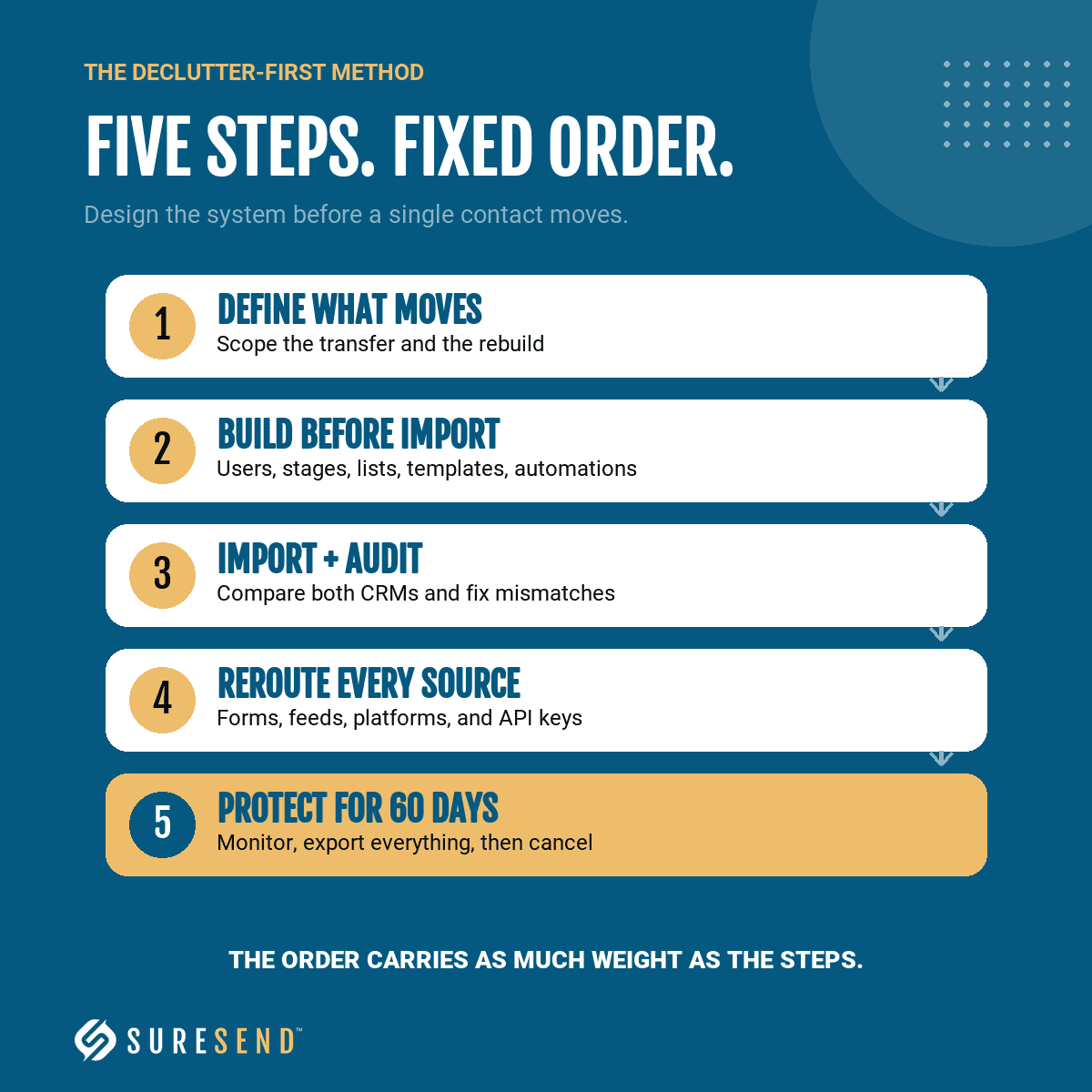
The method runs in five steps, in a fixed order, and the order carries as much weight as the steps themselves. The first defines what your migration will and will not carry. The second builds the destination ahead of the data. The third brings the data in and verifies it. The fourth reroutes every source feeding the pipeline. The fifth protects your old records until the new setup has proven itself. Mira walks clients through this exact sequence, and every step exists because she has watched someone skip it and pay for the shortcut.
Step 1. Know what moves and what does not
Start with the sync. Teams change to Sure Send from CRMs across industries, such as Lofty, Sierra Interactive, Follow Up Boss, Pipedrive, Monday, Salesforce, and many others. The sync migration brings your contacts, notes, tasks, calls, text messages, and emails, along with tags and stages, with the specifics varying by platform.
The Sure Send Help Center spells out what transfers from each source; Mira pulled it up the day before her presentation while planning a client’s move, and she recommends reading it before any export. Whatever platform you are leaving, ask the Sure Send team directly and they will confirm what carries over.
Then comes the list Mira has seen hold as a pattern across every CRM she has migrated: documents and files, email templates, text templates, action plans and automations, smart lists, team branding, settings, and reporting. None of that moves itself. Each piece gets rebuilt in Sure Send, by hand, by Sure Send AI, or by a Marketplace partner, or it stays behind in a platform you are about to shut off.
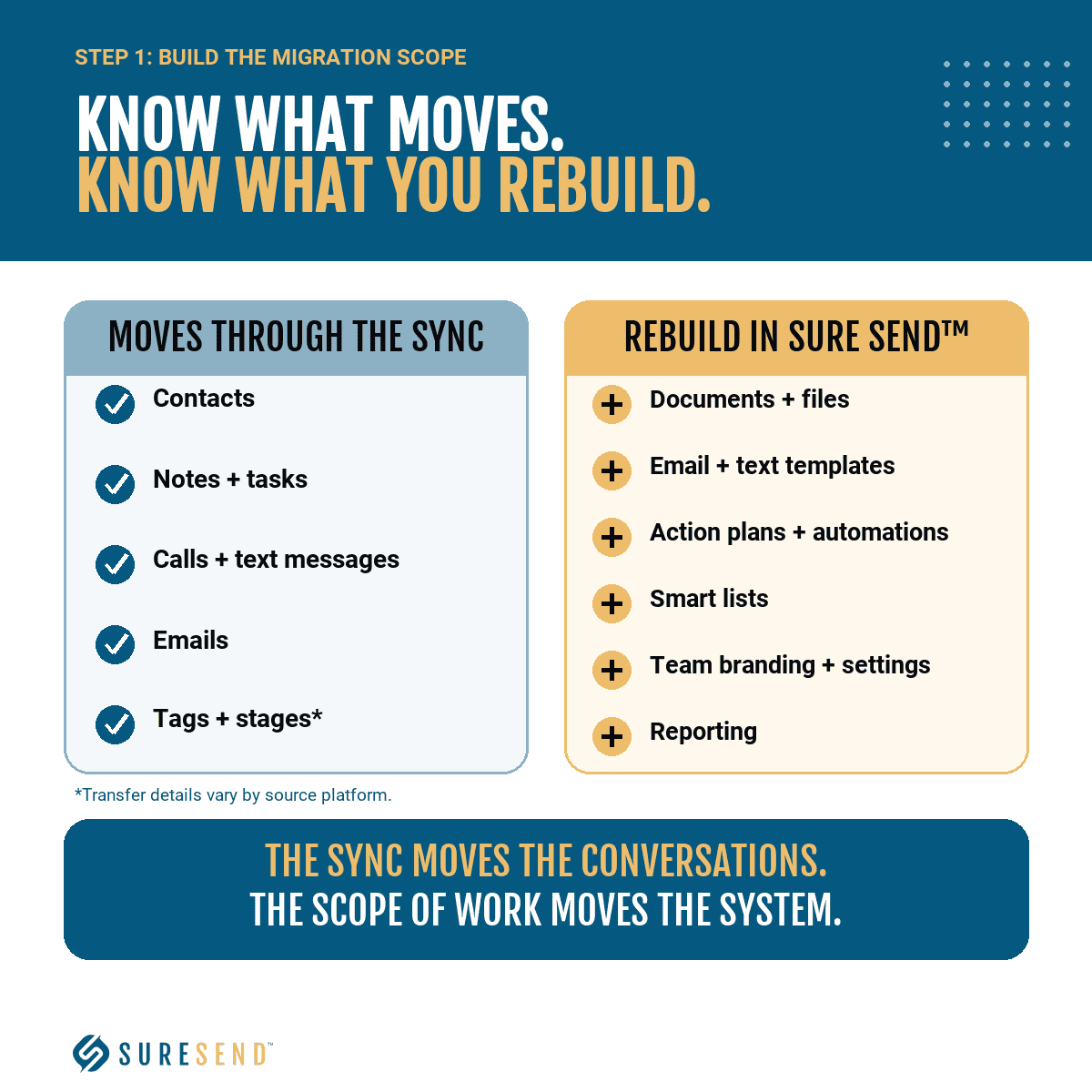
Her practical move closes the gap: turn the does-not-migrate inventory into a written scope of work for whoever handles the rebuild, a consultant or a virtual assistant. The sync moves your conversations; the scope of work is the actual migration plan.
Step 2. Build the system before you import
Resist the urge to import on day one. Mira’s build order puts structure ahead of data: settings and users first, then stages, then smart lists, then email and text templates, then automations. Stages come first: depending on the platform you are leaving, they may not sync across automatically. Without them, a contact marked hot in your old CRM lands in Sure Send with nowhere to go, and the mix-up multiplies across the whole database.
The reason for the ordering is your team. Your agents’ first login should be a working system, with the smart lists they are used to already built and waiting. Announce the move, bring them in the next morning, and the first thing you will hear is “where are the smart lists I’m used to?” unless you answered it in advance. Mira’s framing is blunt: build it for them so they know how to use it. An empty CRM teaches your team to ignore it; a built one teaches them to trust it. Adoption is decided during the build, not after the import.
Step 3. Import, then audit
Bring the data in through the sync or a CSV file. Then audit between the two CRMs: stages, tags, custom fields, and smart lists, checked one against the other to confirm everything matched and imported properly. Mira recommends working from a written checklist and noting anything that did not come through clean, and you already own most of that document: the scope of work from Step 1 doubles as the audit sheet.
Selectivity is the declutter in declutter-first. Her example is automations. If you had ten in the old platform and the last five are legacy workflows nobody has touched in years, import automations 1 to 5 and leave 5 to 10 behind. Import everything and you pay twice: once to move the clutter, again for the virtual assistant who deletes it. The audit is not a formality; it is where you catch the mismatched stage before your agents catch it for you.
Step 4. Reroute every lead source and API key
A clean database in Sure Send means nothing while new leads keep landing in the old system. Reroute every source, one by one, so each channels into Sure Send: ad platforms, website forms, portal feeds, referral intake, all of it. Mira names the failure mode without softening it: you can be sitting in Sure Send while every new lead still funnels into the old CRM, and that serves nobody.
Third-party tools need the same treatment. Platforms with two-way CRM integrations, RealScout and Fello are her named examples, connect through an API key. Disconnect that key from the old CRM and reconnect it to Sure Send, either directly or through Zapier, before anything gets deleted. Her rule for this whole phase: “Don’t hit delete yet. We’re not ready for it.” Some integration partners need time to complete the reconnection on their end, so allow for it rather than forcing the cutover. A missed source leaks quietly for months. This is the step that finds the leak before it costs you a closing.
Step 5. Keep the old CRM alive for 60 days
Do not cancel the old subscription, and do not clear it out. Mira keeps the old CRM running for 60 days while both platforms operate side by side.
Those 60 days are when the strays surface: a source you forgot, an integration partner still mid-reconnection, leads showing up where they should not. Watch the old CRM for anything still landing there and reroute as it appears; as Mira puts it, you never know what you missed. Before any final deletion, download a full CSV export of everything, so the record survives no matter what breaks later. Then cancel.
The trade-off, stated plainly: you will pay two subscriptions at once for those two months. Mira does not dodge it: “If you’re going to pay an additional subscription for your old tool for two months, it’s okay. It’s worth it.” The alternative, in her telling, is deleting your way into losing data and workflows you spent years building. She is right. The overlap is the insurance premium on years of client data, and it is cheap at the price.
Map the client journey before you build the automations
The migration is done, the automation builder is open, and this is exactly where Mira stops her clients. Before anyone builds a single automation, she draws the entire client journey. Pen and paper works fine. Write your lead sources in boxes: Google Ads, referrals, your website, local marketing. Then draw the arrows that answer one question: how everything funnels into one place, the CRM. Then define the process for each client type you serve: buyers, sellers, leads already sitting in your database, past clients, open houses, website activity.
Her maps carry a color code. Yellow is a lead source, green is an agent action, blue is an automation. Anyone can glance at the page and see who, or what, owns each step, which is the difference between a diagram and an operating document.

The funnels also repeat on purpose. The top varies by source, but every one ends the same way: hot, warm, and nurture stages flow into a long-term nurture drip, and contacts who never respond land on an unresponsive smart list. Buyer and seller processes are nearly identical by design. Your agents learn one shape instead of a new sequence per pipeline, and a team that has to relearn the playbook at every stage stops using it.
One team Mira worked with printed the finished map and hung it in their office. “This is your one source of truth of how the system works,” she told them. Follow the arrows and you know that moving someone to hot triggers the hot drip campaign, with no digging through the automations to reconstruct what fires when.
In Sure Send, the map stops being a picture. The stages, smart lists, and drip campaigns on the page are the ones you built in Step 2, and the arrows become live workflows in the visual automation builder. Every strong operator I’ve watched documents the system this way, because a system that lives in one person’s head leaves with that person. Draw it first; Sure Send is where the drawing goes to work.
Doing it yourself vs. bringing in Unbroken Consulting
You have three ways to go from here.
The first is to run the declutter-first method on your own. This article and the Sure Send Help Center genuinely cover it, and a disciplined team leader with a capable virtual assistant can execute every step. Price the effort honestly before you commit: the build lands on evenings and weekends across several weeks, and you find the gaps in your setup by hitting them one at a time.
The second is to bring in Unbroken Consulting through the Marketplace, where the vetting is already done. Discovery is a single call, and the format is Mira’s own: “Bring your coffee, bring your snack, and brain dump on me.” You talk through the way your business runs; she maps it live while you talk. From there she builds the process map, the scope of work, and the setup with you, not for a generic team that resembles yours. The consultation call costs nothing.
The third is to keep what you have, in the old platform or imported wholesale into the new one. The audit earlier in this article already priced that option, and the bill recurs monthly.
One detail tells you more about the second path than a testimonial would. Mira’s site carries a button called Ask Mira: send any technology or systems question and she answers within 1 to 2 business days, free, whether you ever hire her or not. A consultant who gives answers away before any engagement is showing you exactly how the engagement will run.
The trade deserves a plain statement before you decide. You open your operation to an outside expert, you do the brain-dump work yourself, and the mapping sessions take the leader’s hours along with the budget. If that trade reads as fair, contact Unbroken Consulting through the Sure Send Marketplace. The first call is free, and she typically replies with a link to schedule.
Mira opened her session with a warning about what even a better CRM cannot fix on its own. Follow her method, with her or without her, and Sure Send gets to prove what you bought it for: the platform was never the problem, and now neither is the system.
Frequently asked questions
What is Unbroken Consulting?
Unbroken Consulting is a consulting firm for real estate agents and teams, led by principal Mira Brokken. The firm helps agents operate like business owners by designing systems, processes, and CRM strategy around how each business actually runs, not a generic setup copied from another team.
Unbroken Consulting is a vetted partner on the Sure Send Marketplace, listed in three categories: Email, Messaging, and CRM Setup. The first consultation call is free.
What is the declutter-first CRM migration method?
The declutter-first CRM migration method is a five-step process from Mira Brokken of Unbroken Consulting, presented on the Sure Send Marketplace Spotlight. The premise behind it: even the best new CRM inherits whatever mess a legacy system hands it, so you declutter and design before any data moves.
The five steps run in order: know what moves and what does not, build the new system before you import, import and then audit the results, reroute every lead source and API key into the new CRM, and keep the old CRM alive for about 60 days before you delete or cancel anything.
What data transfers automatically when you migrate to Sure Send?
Teams change to Sure Send from CRMs across industries, such as Lofty, Sierra Interactive, Follow Up Boss, Pipedrive, Monday, Salesforce, and many others. The sync migration typically brings over contacts, notes, tasks, calls, text messages, and emails, along with tags and stages, with the specifics varying by the platform you are leaving. The Sure Send Help Center migration article lists what carries over, and it is worth reading before you export anything.
Whatever your current CRM, ask the Sure Send team directly; they will confirm what transfers before you commit.
What does not transfer when you switch CRMs?
The same categories stay behind on every platform: documents and files, email templates, text templates, action plans and automations, smart lists, team branding, settings, and reporting. Sync tools move conversations and contact records; they do not rebuild the machinery around them.
Each of those pieces gets rebuilt in the new CRM, and rebuilding by hand is only one way to do it. You can also put Sure Send AI to work building templates, automations, and smart lists for you, or work with a Marketplace partner such as Unbroken Consulting. Whichever route you choose, turn the full list into a written scope of work, so the rebuild is planned and priced before your team ever logs in.
Should you delete your old CRM right after migrating?
Treat this as a risk decision for your business. Best practice is to keep the old CRM running for about 60 days alongside the new one, and the key is confirming that everything migrated and works the way you want in Sure Send before you turn off the old platform. The overlap window is when strays surface: leads still landing there tell you a source or integration was never rerouted. Reconnect third-party API keys first, and export your complete database to a CSV file before you delete anything.
Moving to Sure Send is the wise decision; how you make the transition, and how fast, is a choice you should make deliberately for your business. Two subscriptions for two months is the price of protecting years of client records, and it is worth paying.
How do you contact Unbroken Consulting?
The direct route is the firm’s Sure Send Marketplace page: suresend.ai/marketplace/partner/unbroken-consulting. Mira Brokken’s phone number and email are listed there, and she typically responds with a link to schedule a consultation call. The call is free and covers what you need and whether the firm is a fit.
Her website also carries a free service called Ask Mira: submit any technology or systems question and get an answer within 1 to 2 business days, with no engagement required.

Kurt UhlirChief Marketing Officer
Kurt Uhlir is a recognized leader in marketing, growth, and innovation, having helped scale companies and technologies used by millions every day—including at brands like AGNT, Sideqik, Vitrue, Oracle, Garmin, Facebook, Meta, Apple, and more. He’s trained tens of thousands of professionals on how to build trust, lead with service, and help clients make wise, informed decisions. At ez Home Search and Sure Send, his focus is on helping high-performing business owners, team leaders, and individual sales leaders grow their businesses through exclusive market access, privacy-first lead systems, and conversion-focused enablement tools.


