

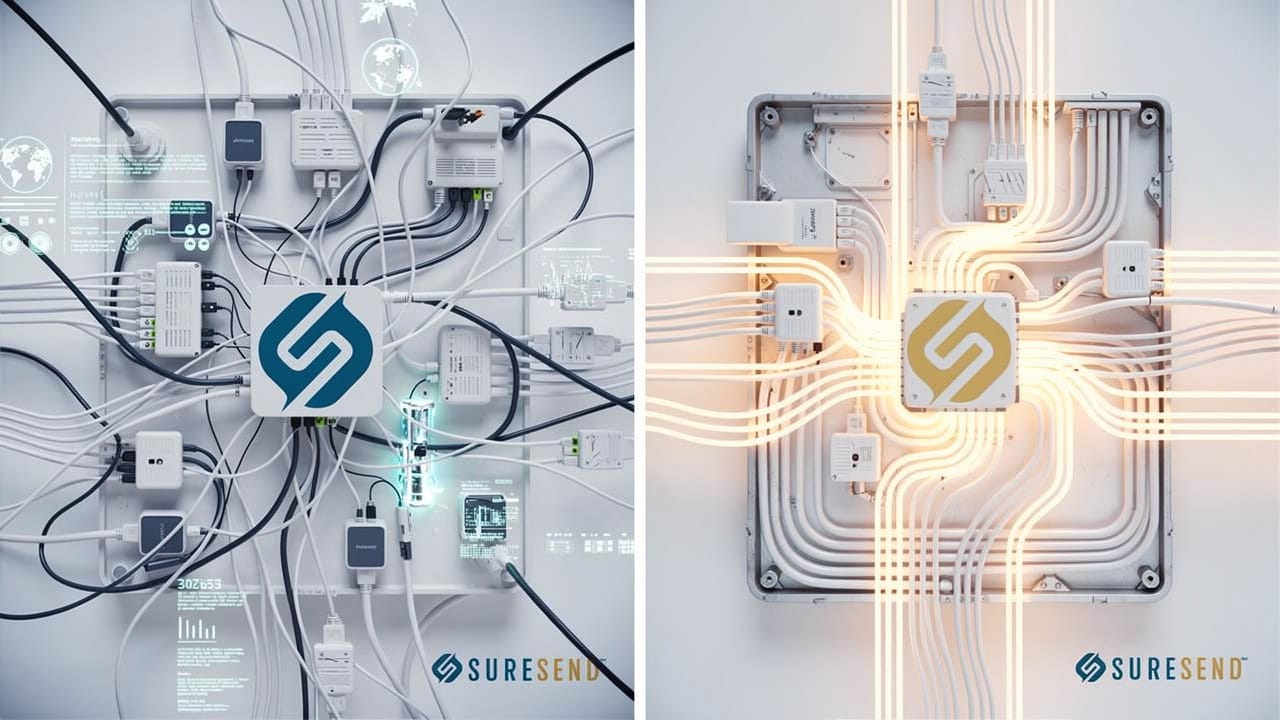
Why Embedded AI CRM Outperforms Bolted On AI Solutions
Most CRM platforms now advertise AI features, but few explain where that AI actually lives, and that detail decides whether it works or just looks good on a pricing page. If you’re deciding whether to bolt AI onto your current CRM or pick a platform with AI already built in, the frustration isn’t a shortage of options. It’s that every vendor calls their approach “AI-powered” no matter how it was built.
The real answer comes down to architecture. Bolted-on AI connects to your CRM from outside, pulling data out, processing it on someone else’s servers, then sending a recommendation back. Embedded AI is built into the CRM’s own data and workflow engine from day one, so it reads and acts on records directly, without a round trip or a translation layer in between. This difference between bolted-on AI vs embedded AI CRM decides what the AI can see, what it’s trusted to act on, and where the whole system tends to break.
This guide walks through both models, using residential real estate agents and teams as the running example, then closes with a short checklist for testing whatever CRM you use now, including AI-first platforms like Sure Send.
Key Takeaways
Embedded AI vs bolted-on AI is an architecture decision, not just a longer feature list on a comparison chart.
Architecture sets what the AI can see, what it’s trusted to act on, and where the whole system tends to break.
Bolted-on AI inside a real estate CRM creates data lag, lost context, and manual handoffs for agents.
Embedded AI executes actions directly, such as outreach and stage changes, instead of only suggesting them to a rep.
The right choice depends on your data sensitivity, team size, and how badly you need real-time execution.
What Is Bolted-On AI in a CRM?
This pattern reflects a broader shift researchers describe as artificial intelligence embeddedness in marketing, where bolted-on AI is a general-purpose layer added to a CRM after the platform was already built, usually through an API connection, a browser plugin, or a chat module sitting on top of the interface. The CRM and the AI are two separate systems that happen to talk to each other, not one system designed around a shared data layer. Because the AI model was built to serve many kinds of software, it can’t natively read your CRM’s database, so every request needs a translation step through a connector. This setup can still produce useful suggestions, but it was never actually designed around your CRM’s specific records, triggers, or workflow logic.
How Bolted-On AI Works Behind the Screen
Picture the real request sequence:
A rep opens a bolted-on chat window.
The tool pulls relevant contact and activity fields from the CRM.
That data ships to a third-party server over the open internet.
A general-purpose model processes it.
A suggestion returns to the screen.
Every step adds a small delay, and every step is a point where the connection can break or a field mismatch can cause silence instead of an answer.
This is why the setup often feels like bolting a GPS unit onto an old car’s dashboard. The GPS gives directions just fine, but it has no wire into the speedometer or the fuel gauge, so it can’t adjust guidance based on what the car itself already knows. A bolted-on AI tool behaves the same way inside a CRM, offering an opinion from outside a system it never actually joined.
What Is Embedded AI in a CRM?
Embedded AI is artificial intelligence built directly into a CRM’s core data layer and workflow engine from day one, so the model reads and writes from the exact same records the rest of the platform already uses. There’s no export step and no separate database to sync, because the AI and the CRM were designed together as one system rather than stitched together after launch. This shared foundation means the AI can see a contact’s full history the instant it runs, and it can also trigger CRM actions directly, moving a deal stage, assigning an agent, or sending a follow-up, instead of just suggesting that a human do it. Sure Send is a built-in AI CRM in this exact sense, with its AI layer running inside the dialer, the inbox, and the contact record rather than sitting on top of them.
Why Native Data Access Changes What AI Can Do
When AI shares the CRM’s own data layer, it sees the complete contact record the moment it runs:
Call transcripts
Property details
Past messages
Open tasks
Not a partial export limited to whatever fields a connector was built to support. That completeness matters because sales decisions depend on context a partial dataset can’t provide. A lead that looks cold in an exported spreadsheet might have replied to a text ten minutes earlier, and AI working from stale data has no way to know that.
The bigger shift is what the AI gets to do once it has that context. Bolted-on tools tend to stop at a recommendation and leave a human to act on it, while embedded AI can carry the action through on its own. Inside Sure Send, AI Calling, AI Texting, and AI Chat run as actual automation steps rather than chat suggestions, so outreach happens the moment a trigger fires instead of whenever a rep gets around to it.
Why Architecture Determines What AI Can See, Act On, and Break
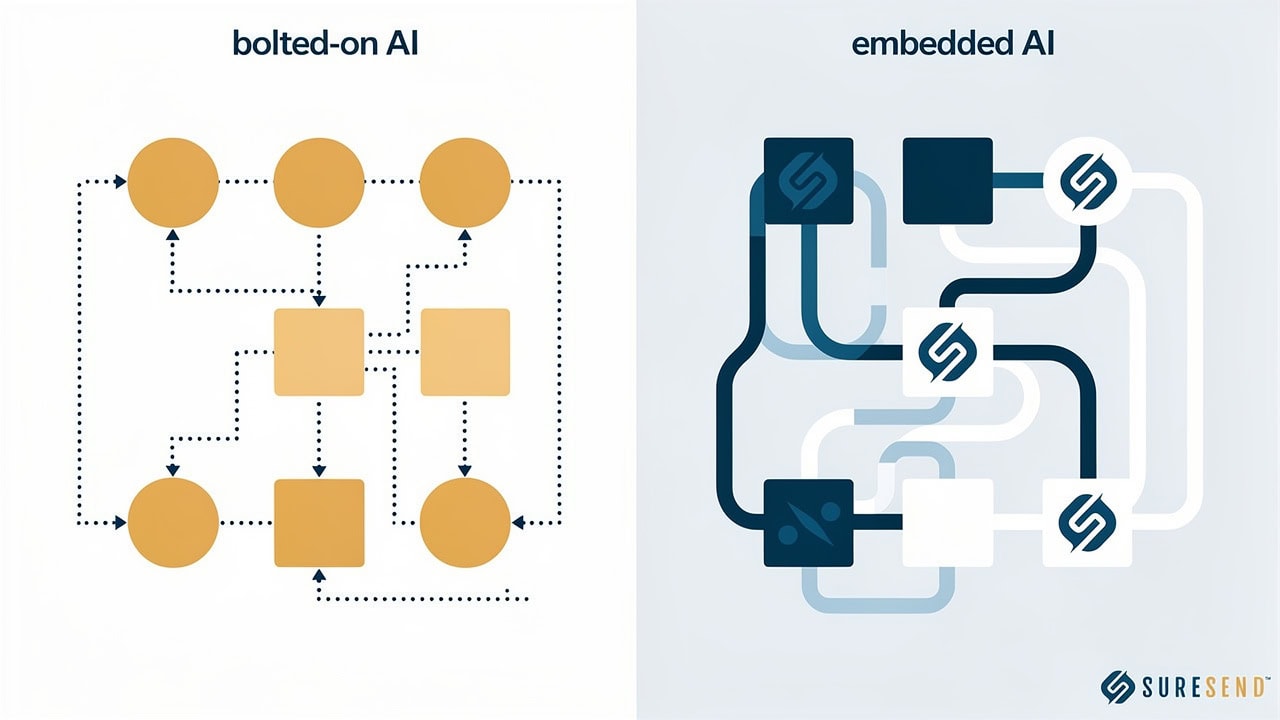
Architecture is the real variable behind every AI comparison, because it sets three hard boundaries before a single feature gets built:
Visibility whether AI can see a complete record or only the fields a middleware connector was coded to expose.
Authority whether AI can only recommend an action or whether it’s trusted to execute CRM functions on its own.
Failure how many handoff points sit between the data, the decision, and the action, since each handoff is a place something can go wrong.
A CRM with AI added on usually loses on all three counts at once, because partial visibility, recommend-only authority, and multiple handoffs tend to travel together.
Where Bolted-On AI Breaks Down in Practice

Middleware connectors only pass along the specific fields and triggers they were coded to support, which means they break the moment either platform changes its API or adds a new field type. A team often won’t notice right away, since the connector frequently fails silently, quietly dropping new leads or missing a property update for days before anyone checks the sync logs.
A second failure shows up in the numbers themselves. A bolted-on tool might calculate win rate using a different date window than the CRM’s own dashboard, or score a lead using criteria the native report doesn’t apply at all. Now two systems answer the same question two different ways, and a sales manager has no reliable way to know which number to trust during a pipeline review.
Bolted-On vs. Embedded AI CRM Architecture: A Side-by-Side Comparison
The differences covered so far condense into five practical dimensions worth comparing directly: data access, execution capability, latency, metric consistency, and dependency on middleware. None of these sit on a strict either-or switch, since some platforms blend pieces of both models, but the table below shows where most bolted-on and embedded systems land in practice. Treating this as a spectrum of architectural depth, rather than a simple checklist, explains why two CRMs can both claim “AI-powered” status while performing nothing alike day to day.
Comparison Table: Data Access, Execution, and Failure Points
Here’s how the two models stack up across the areas that affect daily CRM performance the most.
| Factor | Bolted-On AI | Embedded AI |
|---|---|---|
| Data Access | Partial fields exposed by a connector | Complete contact record in real time |
| Action Execution | Recommends; a human must act | Executes CRM actions directly |
| Latency | Round trip to external servers | Processes within the existing platform |
| Metric Consistency | Can calculate figures differently than the dashboard | Uses the same data and definitions as the dashboard |
| Dependency on Middleware | High, breaks when either API changes | Low to none, native integration |
| Typical Failure Point | Connector sync failure or silent data drop | Data quality gaps within the core CRM itself |
The pattern across every row repeats itself: embedded AI inherits the CRM’s own accuracy and speed, while bolted-on AI inherits the limits of whatever connector sits in between.
How Bolted-On AI Plays Out for a Real Estate Team

Picture a real estate team running a AI lead scoring guide or AI chatbot added to a legacy CRM that was never built with AI in mind. The plugin only sees the contact fields it was configured to pull, so when a seller’s listing gets a price drop or a buyer’s saved search matches a new listing, that event never reaches the AI, because the connector wasn’t built to watch for it.
The agent still has to check the MLS separately, notice the change, log the call manually, and decide alone whether the AI’s generic suggestion to “follow up soon” is even still relevant. The AI technically exists in the stack, but the agent is doing most of the work it was supposed to handle.
Why This Costs Real Estate Teams Time and Deals
Life-event signals are where this gap costs you real money. A listing expiration, an equity milestone, or a home purchase anniversary are exactly the moments when a seller or past client is most open to a conversation, but bolted-on tools can’t trigger automatically off data they were never connected to in the first place. By the time a connector syncs, if it syncs at all, a competing agent may have dollar value of a call.
The rest of the cost shows up as administrative drag. Agents end up updating pipeline stages by hand, writing follow-up texts from scratch, and cross-checking property records across two or three separate screens, tasks that eat into the hours that should go toward live conversations with buyers and sellers.
How Embedded AI Changes the Workflow for Real Estate Agents and Teams

Embedded AI flips this sequence because the intelligence layer and the data layer are the same system, so a property value change or an equity milestone can trigger personalized outreach the moment it happens, without a rep ever deciding to act first. This is what a real estate CRM solutions looks like in practice: Sure Send’s AI layer works across contact enrichment, property data, and outreach at once, so when a tracked home crosses a relevant threshold, a text or call sequence can start automatically instead of waiting for someone to notice. Before an agent even picks up the phone, a pre-call summary and the Take Action Automation queue have already surfaced the highest-priority contacts with context attached, replacing the manual list-building that used to eat up the first hour of the day.
What Changes Day to Day for an Agent or Team Lead
Day to day, the biggest change is that calls, texts, email, and pipeline movement all live in one workspace, so an agent never switches applications to find the thread of a conversation. AI Lead Scoring updates continuously from actual contact behavior instead of static rules someone set up a year ago and never revisited, so the names at the top of a rep’s list today are the ones actually worth calling today.
One Sure Send customer who had built a stack around a popular CRM plus several add-on tools for email, lead scoring, and chat consolidate sales marketing tools and cut roughly $39,000 a year in software spend, while gaining trigger-based automation their old patchwork of tools couldn’t produce.
Is Bolted-On AI Ever the Right Choice?
Bolted-on AI isn’t automatically the wrong answer, it has a real place for teams testing whether AI even fits their process before committing to a bigger change. A small brokerage running a short trial, a solo real estate agent on a handful of leads, or a legacy system that genuinely can’t be replaced this year are all reasonable settings for a bolted-on tool.
The trouble starts once volume grows. A plugin that handles 50 contacts fine often buckles at 5,000, because connector overhead, sync delays, and manual verification work don’t scale down, they scale up right alongside the lead count. What felt like a minor inconvenience at launch turns into a daily bottleneck within a year or two.
Bolted-on AI buys time, not a long-term architecture.
It’s a reasonable bridge while a team figures out what it actually needs, but treating it as a permanent foundation usually means rebuilding the stack later, under more pressure and with more data to migrate.
How to Evaluate Your CRM’s AI Architecture

Whatever CRM you use today, you can test whether its AI is embedded or bolted on without a technical background. Start by asking the vendor directly whether the AI calculates metrics the same way the platform’s own dashboard does, whether it can execute an action like moving a stage or scheduling a follow-up on its own, and whether your data ever leaves your account to get processed. For developers evaluating AI CRM architecture that real estate teams can scale with, also ask whether the platform offers an CRM data independence Protocol support, since that signals an architecture built to be extended rather than worked around. Then run a simple check yourself: pull up a lead score or win-rate figure from the AI and compare it against the native report for that same contact.
Questions to Ask Before You Choose or Switch
Keep this short list nearby during any CRM demo or renewal conversation, since vendors rarely volunteer this level of detail on their own.
Does the AI operate inside your existing data, or does it need to export records to an outside server before it can respond? If a vendor describes a “connection” to a separate AI provider, that’s a sign the architecture is bolted on. Ask what happens to your data once it leaves your platform, and whether you can see or delete it afterward.
Can the AI execute CRM actions directly, such as moving a contact’s stage or sending a follow-up, or does it only suggest actions for a rep to carry out? Recommend-only AI still needs a human in the loop for every action, which limits how much time it can really save. Direct execution is the clearer sign of a built-in AI CRM rather than a connected one.
How many middleware connectors sit between your core tools, and what breaks for your team if one goes down for a day? Each connector is a separate point of failure that neither vendor fully controls. Ask for a specific example of what fails first and how long it usually takes to fix.
The Takeaway
Bolted-on and embedded AI aren’t two versions of the same feature, they’re two different architectures that decide what AI can see, what it’s trusted to act on, and where the whole system tends to break first. A CRM can mention AI on every page of its marketing site and still leave a rep doing the real work by hand if that AI was added after the fact rather than built into the platform’s core, which is why the distinction between a single platform for pipeline and AI versus a bolted-on MCP server matters so much when comparing vendors.
The fastest way to know which one you’re dealing with is to run the questions above against your current CRM this week, rather than waiting for a renewal conversation to force the issue. For real estate teams and other sales-driven businesses that need AI to execute, not just recommend, Sure Send’s embedded architecture was built around that requirement from day one, pulling data access, automation, and coaching into a single system instead of a real estate technology stack.
Frequently Asked Questions
Can I Add Embedded-Style AI Features to My Current CRM Without Switching Platforms?
Adding AI plugins or middleware to your current CRM still creates a bolted-on architecture, regardless of how “integrated” the marketing sounds. True embedded AI requires the CRM’s core data and workflow engine to be designed around it from day one, something no plugin can retrofit after launch.
Does Embedded AI Cost More Than Bolted-On AI Tools?
Not usually, once you add up the full stack. Bolted-on tools look cheaper individually, but stacking separate subscriptions for email, lead scoring, and chat, plus the middleware connecting them, often CRM pricing comparison than one consolidated embedded platform with the same capabilities built in.
How Do I Know if My Real Estate CRM’s AI Is Actually Embedded?
Test whether an AI-suggested action, like a follow-up text, fires automatically or still needs you to copy, edit, and send it yourself. Also check whether the AI pulls from the same contact and property data shown elsewhere in your CRM. If either points to manual work or separate data, it’s bolted on.
Can Bolted-On AI Tools Access Real-Time MLS or Property Data Updates?
Only if the connector was specifically built to support that field and update frequency, and many weren’t. Embedded systems with IDX integration guide, like Sure Send, can trigger outreach the moment a relevant change happens, without waiting on a sync cycle that might run once a day or not at all.
Will Switching to an Embedded AI CRM Disrupt My Team’s Current Workflow?
Usually not, since embedded AI is designed to sit inside the calls, texts, and emails your team already handles rather than add a new tool to learn. Teams moving to an embedded platform like Sure Send typically see 48-hour onboarding rule up within the first week.

Written by