
Database Reactivation ROI: Real Numbers from Real Campaigns
Your CRM probably holds hundreds of past leads who never closed, and every month more budget goes toward buying fresh ones instead of calling them back. That split feels safe, but it rarely gets tested with real math, so nobody on the team can say which dollar actually earns more.
Database reactivation ROI measures how much revenue you recover from re-engaging contacts who already know your business, against what it actually costs to do that work well. This article builds that calculation with you step by step, covering cost per conversation, cost per appointment, cost per opportunity, and finally cost per closing from your database. We compare that honestly against paid lead economics, without inventing universal conversion numbers that may not match your market. You’ll also see where deliverability, segmentation, and automation quietly change the outcome.
Start with the definition most teams get wrong before you build your own numbers below.
Key Takeaways
Your database is a cost asset you already paid for, not a free list sitting around for occasional use.
Cost per closing from reactivation is calculable using your own CRM history, not a universal industry benchmark.
Paid leads and database reactivation solve different problems, so treat them as partners, not rivals for budget.
Deliverability, data quality, and prioritization determine whether your reactivation ROI is real or imaginary.
Segmentation and automation are what let the math work once your list grows past a handful of names.
What Is Database Reactivation ROI, Really?
Database reactivation ROI is the return a team earns when it turns dormant CRM contacts back into paying closings, measured against the real cost of running that outreach. Put simply, it answers the question of whether reactivation deserves budget instead of new customer acquisition: dormant contacts were already paid for once, so reactivating them often costs less per closing than buying a brand-new lead to replace that same outcome. The shape of the formula stays constant even when your numbers don’t match anyone else’s. You take every dollar spent reaching a group of dormant contacts, including tools, staff time, and cleanup work, and divide it by the conversations, appointments, or closings that effort produced.
This article will not hand you a universal conversion rate benchmark, because one does not exist in a form worth trusting. A team with a clean 400-contact database and a tight follow-up habit will see very different numbers than one with 4,000 untouched records and no clear ownership of who calls whom. What does transfer across teams is the calculation framework itself.
Treat the sections below as a worksheet. Each one adds a layer to the formula, using your own CRM data rather than someone else’s average, so the final number reflects your market, your list, and your follow-up habits.
Why Your Database Is a Business Asset, Not a Free List
Your database is a business asset because every contact in it already cost money, time, or a referral relationship to acquire, not a free list you happened to collect along the way. Ad spend, open house time, sign calls, and referral partnerships all fed that list at some point. When a contact goes dormant without closing, that acquisition cost does not disappear. It just sits unrecovered on the books, waiting for someone to either write it off or go get the value back out.
Treating treating reactivation as a real line as a real line item, with real hours and real tools assigned to it, is how you recover that sunk spend instead of quietly absorbing the loss. This is the mental shift that separates teams who mine their database every quarter from teams who only think about it when new leads get expensive. The recovery math works in your favor because you are not paying to acquire these people again, only paying to reach them a second or third time, in fact, database reactivation runs 5 to 25 times cheaper than new acquisition, which is why this channel deserves a real budget line rather than leftover attention.
The asset case gets stronger once you factor in what happens after a reactivated contact closes. Repeat transactions and referrals from a past client compound the original acquisition cost across years, not just across one deal. A single reactivated closing today can produce a referral eighteen months from now, which means the true value of your database rarely shows up in a single quarter’s reactivation report.
How to Calculate Your True Cost Per Conversation
Cost per conversation is the first real number in your database reactivation ROI formula, and it is simpler than most agents expect once you isolate the right inputs. Add up everything spent running a reactivation effort over a defined period, including CRM or tooling fees, data cleanup, and any staff hours dedicated to the work, then divide that total by the number of actual two-way conversations you had, not messages sent or dials attempted. A text that gets ignored is not a conversation. A call that reaches voicemail is not a conversation. Only count the moments where a contact actually responded, replied, or picked up, because those are the only outcomes that can eventually turn into appointments and closings.
Most teams underestimate this number because they only count the obvious line items and skip the costs hiding inside everyday workflow.
Agent time per dial and text adds up fast when nobody tracks it, since even five minutes per attempted contact across a 500-name list represents dozens of hours that could otherwise go toward live appointments. Most teams never assign a dollar value to this time, which quietly inflates the real cost per conversation once you do the math honestly.
List cleaning and data enrichment eat hours before outreach even starts, because dead numbers, bounced emails, and duplicate records have to be found and removed first. Skipping this step doesn’t save money, it just moves the cost downstream into wasted sends and wasted dials that never had a chance of connecting.
Compliance review, including checking consent status and opt-out history under rules like TCPA for calls and texts, takes real staff time, particularly on an older list where consent records may be incomplete. Ignoring this step creates legal risk that dwarfs any marginal savings from skipping the review.
Deliverability losses from bounced or filtered emails mean some of your “sends” never had a chance to become a conversation at all, which silently shrinks your real response rate without showing up anywhere in a basic sent-count report.
Direct Costs vs Hidden Costs in Reactivation Campaigns
Direct costs are the expenses you can see on an invoice without digging, and they are the easiest part of the formula to get right. CRM and automation tooling fees, data enrichment subscriptions, and per-message SMS or dialing costs all show up clearly on a monthly bill, which makes them simple to plug straight into your cost-per-conversation math.
Hidden costs are harder to spot but often larger in total. Staff time spent manually building lists and chasing follow-up, email sends wasted on bounced or undelivered addresses, and the repeated cleanup required as database records decay over time all drain budget without appearing on any single invoice. A team that only tracks direct costs will consistently believe reactivation is cheaper than it actually is.
From Conversation to Appointment: Calculating Cost Per Opportunity
Calculating cost per opportunity means extending the same conversation-level formula up the funnel, one ratio at a time, using numbers your own pipeline already contains. Once you know your cost per conversation, divide it by your conversation-to-appointment rate to get cost per appointment, then divide that figure by your appointment-to-opportunity rate to get cost per opportunity. Each step simply asks what share of the previous stage advances to the next one.
The reason this matters is that the ratios themselves vary wildly between teams, markets, and even individual agents on the same roster. A rep working a warm, well-documented sphere might convert one in three conversations into an appointment, while a rep working a stale, poorly segmented list might need eight or ten conversations for the same result. Neither number is wrong, they simply describe different starting conditions.
This is exactly why industry-wide benchmarks mislead more than they help. Pulling a generic “appointment conversion rate” from a blog post and applying it to your own cost-per-conversation figure produces a number that looks precise but means nothing for your business. Your historical CRM data, even six months of it, gives you a far more honest multiplier.
Once you have cost per opportunity calculated from your own ratios, you have the real building block needed for the final step, cost per closing from your database. That number is the one leadership actually cares about, because it can be placed directly next to what a paid lead costs to close.
Database Reactivation vs. Paid Leads: Comparing the Real Economics

Comparing database reactivation against paid leads means weighing two very different cost structures rather than picking a universal winner for every business. Paid leads carry a clear, upfront acquisition cost per lead, but the contact knows little or nothing about your business, so trust has to be built from scratch before a conversation even becomes possible.
Database reactivation works almost the opposite way: the marginal cost of reaching an existing contact again is close to zero compared to acquiring a new one, and the contact already has some familiarity with your name, your past outreach, or even a previous proposal they reviewed, echoing the idea of a zero marketing channel hiding inside a CRM that most teams already have but rarely mine systematically. What reactivation does require is staff time and a working system, since nobody re-engages a cold database contact by accident.
The honest conclusion from comparing paid leads versus database economics is that both channels are solving different problems, not competing for the same dollar. Paid leads buy volume and predictability on a schedule you control, which matters when your pipeline needs fresh names every month regardless of what your past database can produce.
Database reactivation recovers value from money you already spent, often at a meaningfully lower cost per closing once staff time is used efficiently, but it cannot manufacture brand-new market coverage the way paid lead generation can. A team thinking in either-or terms is usually solving the wrong question. The better question is how much of this month’s budget goes toward each channel, given what your own ratios say about cost per closing from your database compared with cost per closing from paid sources.
What Paid Leads Cost That Reactivation Doesn’t
Putting the two channels side by side makes the tradeoffs concrete enough to bring into a budget conversation with ownership or leadership.
| Factor | Paid Leads | Database Reactivation |
|---|---|---|
| Acquisition cost | Paid again for every new name | Already paid for, no repeat acquisition spend |
| Trust and familiarity | Low, built from first contact | Higher, based on prior interaction |
| Time to first conversation | Often slower, cold outreach | Often faster with the right trigger |
| Ongoing cost per touch | Recurring per-lead fee | Mostly staff time and tooling |
Why Deliverability Quietly Destroys Reactivation ROI
Deliverability quietly destroys reactivation ROI because an email that never reaches an inbox has exactly zero chance of becoming a conversation, no matter how good the message inside it is. Real estate email campaigns carry some of the highest bounce rates of any industry, and industry-wide inbox placement for legitimate marketing email has slipped as spam filters have grown more aggressive. Every message that lands in a spam folder or bounces outright is wasted reactivation spend, since it was already counted in your cost calculation but produced no chance at a reply.
This is a structural problem most agents never diagnose, because a sent-count report looks identical whether the message landed in an inbox or disappeared into a filter. The team assumes the contact simply ignored the outreach, when in reality the message never had a fair shot at being read. That hidden failure rate quietly inflates the real denominator in your cost-per-conversation formula every single time it happens.
Sure Send™ addresses this at the infrastructure level rather than treating it as an afterthought. Its proprietary, in-house email delivery system monitors domain health and throttles sends specifically to protect protect inbox placement, instead of relying on shared, rented infrastructure the way many CRMs do. For a reactivation campaign, that difference shows up directly in the math, because more delivered messages means more real conversations for the same spend.
How Segmentation and Prioritization Change the Math
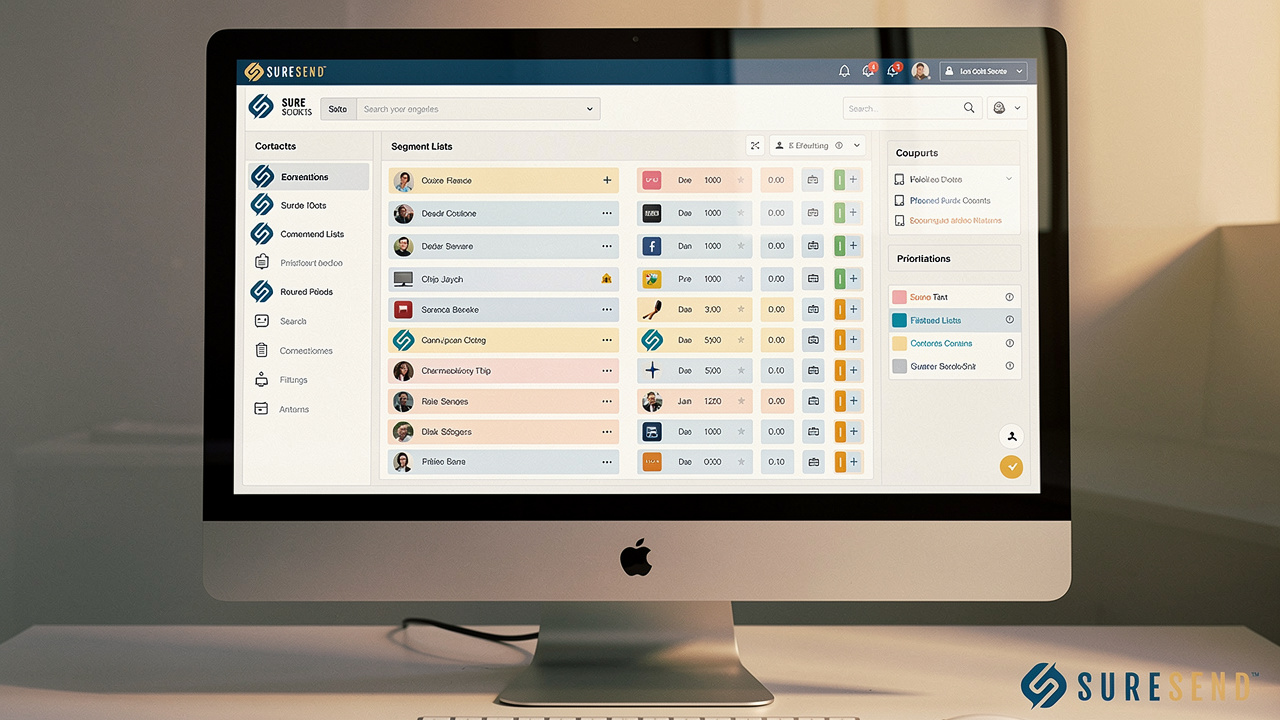
Segmentation and prioritization change the math because not every dormant contact deserves the same outreach, and treating them identically wastes effort on the names least likely to respond. A contact who dropped off after receiving a detailed proposal eighteen months ago is a completely different opportunity than one who filled out a form and never replied to a single follow-up. Grouping contacts by how long they’ve been dormant, where they stalled in your funnel, and the documented reason they went quiet lets you prioritize the prioritize the segment most likely to convert first, which directly improves every ratio in the cost-per-closing formula built above.
This kind of segmentation used to require hours of manual filtering inside a CRM, pulling lists by hand and cross-referencing notes one record at a time. Sure Send’s natural-language Smart Lists remove that bottleneck by letting a team build a segmented reactivation list just by typing a plain request, something like “show me everyone I haven’t talked to in 30 days.” That single change cuts the manual list-building time that otherwise inflates cost per conversation before a single message even goes out.
The payoff compounds once you separate segments properly. A high-intent, late-stage segment that gets a direct, urgent message will almost always outperform a blanket email sent to every dormant contact regardless of history, and the cost difference between those two approaches shows up clearly once you track cost per appointment by segment instead of as one blended average.
How Daily Prioritization Prevents Contacts From Going Cold Again
Prioritization is not a one-time campaign setup task, it has to show up in daily rep behavior or reactivated contacts simply drift cold again within a few months. A list segmented perfectly in January does nothing if nobody revisits it in March, April, and May with the same discipline.
The platform’s Take Action Automation addresses this by putting high-value, under-contacted records in front of the team every single day, based on engagement signals and timing rather than alphabetical order or guesswork. That daily queue is what prevents a newly reactivated lead from sliding back into the same dormant pile it just came out of, turning a one-time campaign win into an ongoing habit instead.
How Automation and Trigger-Based Outreach Lower Cost Per Closing
Automation and trigger-based outreach lower cost per closing because they replace generic, manually written blasts with timely messages tied to something real that just changed in a contact’s life. A trigger might be a shift in local home values, a change in equity position, an adjustable-rate mortgage reset date approaching, or a documented life event like a new job or a growing family. Each of these turns a cold, dormant record into a message that feels specifically relevant, which raises response and conversion rates without adding a single extra hour of staff time to write and send it.
This matters directly for your cost-per-closing formula because the denominator stays the same while the numerator, actual responses, goes up. A rep is not working harder, the system is simply choosing a smarter moment to reach out, grounded in a real reason the contact might care right now instead of six months ago when the trigger hadn’t happened yet.
Quantifying the payoff at the individual level is where most reactivation efforts fall apart, because activity and revenue rarely get connected in any visible way. Sure Send’s Winning Formula solves this by assigning a real dollar value to every call to every call or completed activity, based on a rep’s own six-month rolling conversion history rather than a generic industry assumption.
That connection turns reactivation outreach into a measurable measurable revenue activity activity instead of a vague best practice everyone agrees is probably worth doing. A rep can see, in dollars, what another ten reactivation calls this week are statistically worth to them personally, based on their own closing history rather than someone else’s.
How to Put a Dollar Value on Your Own Reactivation Campaign
Putting a dollar value on your own campaign means pulling five numbers directly from your CRM rather than borrowing anyone else’s averages. Start with contacts reactivated, meaning anyone in your dormant list who was actually touched during the campaign window. From there, track conversations held, appointments set, opportunities created, and finally closings won, recording total cost spent at each of those stages along the way.
With those five figures in hand, the earlier formulas in this article become a single worksheet you can run every quarter:
Divide total cost by conversations for your first ratio.
Layer in your own appointment rate the same way you built it above.
Apply your opportunity rate on top of that.
Arrive at a real, defensible cost per closing from your database.
That number is what justifies next quarter’s reactivation budget to ownership, built on your market and your list instead of an estimate pulled from somewhere else, and it tends to align with broader benchmarks showing a 10-50x return on every dollar spent on reactivation.
If you want a deeper walkthrough before building this out, Sure Send publishes a CRM evaluation guide and a dedicated database reactivation playbook covering segmentation, automation setup, and reporting in more detail for teams ready to put this into practice.
The Takeaway
Database reactivation ROI is calculable with your own numbers, not a figure you borrow from an industry average or a competitor’s case study. Build it from your own cost per conversation, appointment, opportunity, and closing, and you get a defensible answer to whether this budget belongs in reactivation, new lead acquisition, or both.
Deliverability, segmentation, and automation are the three levers that turn a dormant list into a repeatable revenue channel rather than a one-time campaign that fades by summer. Run your own numbers this week, starting with the formula above, and consider a platform built around supporting that math with real infrastructure instead of leaving you to guess.
Frequently Asked Questions
How Long Should I Wait Before Reactivating A Cold Lead?
Timing depends on documented dormancy stage rather than a single fixed number, with common windows falling around 30 to 90 days, 90 to 180 days, and 180 days or more. Each window calls for a different tone and message. Trigger events like a rate change or a life event can override the standard waiting period entirely and justify reaching out sooner.
Is Database Reactivation Worth It For A Small Team With A Short Lead List?
Yes, even a few dozen dormant contacts can produce a positive database reactivation ROI, because the marginal cost per contact is low once basic tooling is in place. The real constraint for small teams is rarely the list size, it’s time. Automation and daily prioritization address that time constraint directly, making reactivation realistic even without a large staff.
How Do I Know If My Database Is Too Outdated To Reactivate?
A large share of CRM data decays every year as emails, phone numbers, and job details change without anyone updating the record. Run a quick audit checking valid emails, valid phone numbers, and last-contact dates before launching a campaign. An outdated database is usually a sign you need enrichment and enrichment and cleanup first, not a reason to abandon the list entirely.
What Compliance Issues Should I Watch For When Reactivating Old Contacts?
Watch for consent and opt-out requirements requirements covering both email and text outreach, including rules like CAN-SPAM for email and TCPA considerations for calls and texts to old contacts. Document each contact’s consent status as part of your segmentation process, not as something you check only if a complaint comes in later. This protects the business and keeps your reactivation list clean.
Should I Use The Same Outreach Cadence For Every Segment Of My Database?
No, high-intent segments like late-stage drop-offs who received a proposal warrant faster, more direct faster, more direct outreach since they are closer to a decision already. Early-stage inquiries who barely engaged need a lighter, more educational cadence instead, since pushing too hard too soon tends to backfire and burn the contact out before they’re ready.
How Does Repeat And Referral Business Factor Into Reactivation ROI?
Reactivated contacts who close often generate future referrals and repeat transactions years down the line, adding long-term value that a single closing’s cost-per-close number never captures on its own. This means the true database reactivation ROI for a given campaign often understates the real payoff, since the compounding value from referrals shows up well after the original report gets filed away.

Written by